# Change only updates

## What is a Change Only Update?

A Change Only Update (COU) file contains only features that have changed in the feature type since the last version​

The following attributes are used to determine how to process each of the records provided in your Change Only Update files​

1. Unique Identifier: The unique identifier for the feature type, one of; UPRN, USRN, OSID​
2. Version Date: This is the date when the feature was last updated in OS product databases.​
3. Version Available From Date: This is the date when the feature became the latest version and was published to customers.​
4. Version Available To Date: This is the date when the feature was superseded by an update or ceased to exist.​
5. Change Type: This is a code list which gives more information about the type of change which has occurred, and in simplest terms can relate to:​
   * <mark style="color:green;">INSERTS</mark>
   * <mark style="color:yellow;">UPDATES</mark>
   * <mark style="color:red;">DELETES</mark>

<table><thead><tr><th width="258">Change Type</th><th>Definition</th></tr></thead><tbody><tr><td><mark style="color:green;">New​</mark></td><td><mark style="color:green;">The feature has been added to Ordnance Survey's master database.​</mark></td></tr><tr><td><mark style="color:green;">Moved From A Different Feature Type​</mark></td><td><mark style="color:green;">The feature has been updated, resulting in it changing feature type.​</mark></td></tr><tr><td><mark style="color:yellow;">Modified Attributes​</mark></td><td><mark style="color:yellow;">One or more attribute values, excluding the geometry, have been altered.​</mark></td></tr><tr><td><mark style="color:yellow;">Modified Geometry​</mark></td><td><mark style="color:yellow;">The geometry only of the feature has been altered.​</mark></td></tr><tr><td><mark style="color:yellow;">Modified Geometry And Attributes​</mark></td><td><mark style="color:yellow;">The geometry and one or more other attributes of the features have been altered.​</mark></td></tr><tr><td><mark style="color:red;">End Of Life​</mark></td><td><mark style="color:red;">The feature has been removed from Ordnance Survey's master database.​</mark></td></tr><tr><td><mark style="color:red;">Moved To A Different Feature Type​</mark></td><td><mark style="color:red;">A feature which has been updated, resulting in it being removed from this feature type and added to another one.​</mark></td></tr></tbody></table>

## ​What can I order?​

COU Files are **only** available with:

* CSV files, not GeoPackages
* A daily or monthly schedule​
* Unfiltered OS NGD Supplies\*

\**Filtered Data*: An OS Select+Build recipe which has been filtered by attribute values or a Data Package filtered by geographic coverage​

*Unfiltered Data*: A recipe or data package which has not had any filters applied (attribute or geographic)​

GeoPackage files

<table><thead><tr><th width="322">Initial Supply</th><th>Update Options</th></tr></thead><tbody><tr><td>Daily (filtered / unfiltered)​</td><td>Not available​</td></tr><tr><td>Monthly (filtered / unfiltered)​</td><td>Monthly Full Supply​</td></tr><tr><td>Annual (filtered / unfiltered)​</td><td>Annual Full Supply (from March)​</td></tr></tbody></table>

Comma-Separated Values (CSV) files​

| Daily (filtered)​               | Not available​                      |
| ------------------------------- | ----------------------------------- |
| Daily (unfiltered)​             | Daily COU​                          |
| Monthly (filtered)​             | Monthly Full Supply​                |
| Monthly (unfiltered)​           | Monthly COU or Monthly Full Supply​ |
| Annual (filtered / unfiltered)​ | Annual Full Supply (from March)​    |

[Gitbook: OS NGD data ordering and currency](https://osngd.gitbook.io/osngd/getting-started/os-ngd-core-principles/os-ngd-data-ordering-and-currency)

## Processing COUs​

The process to load the COU files will depend on a number of factors based on your own environment and requirements, including:​

<table data-view="cards"><thead><tr><th></th><th></th><th></th></tr></thead><tbody><tr><td><strong>Database software</strong></td><td>What are you loading it <em>into?</em></td><td></td></tr><tr><td><strong>Data loading method or software</strong></td><td><em>How are you loading it?</em></td><td></td></tr><tr><td><strong>Feature retention and lifecycle requirements**</strong></td><td><em>How much data do you want to keep?</em></td><td></td></tr></tbody></table>

\*\*There are two main scenarios that represent either extreme of the feature lifecycle options:​

* Latest feature view​
* Full feature Archive

## Processing a COU

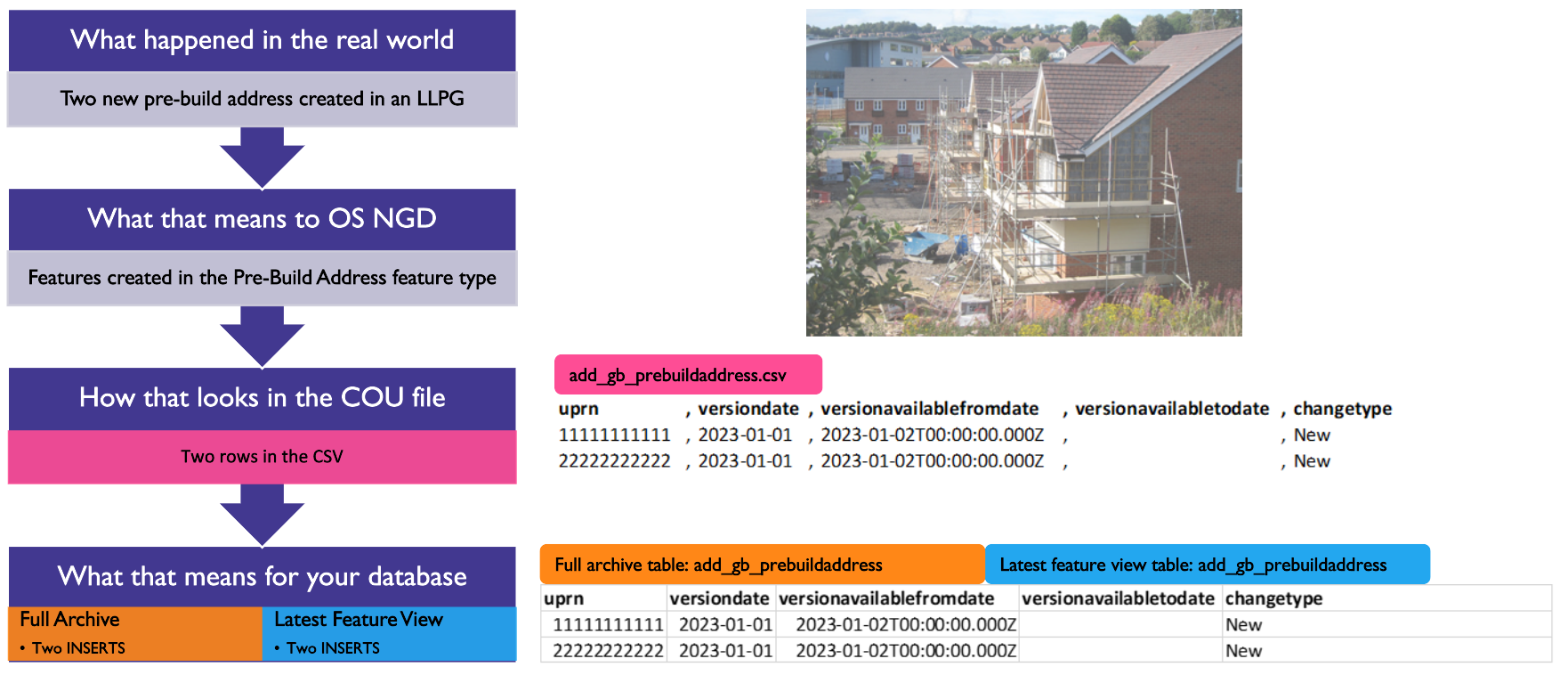
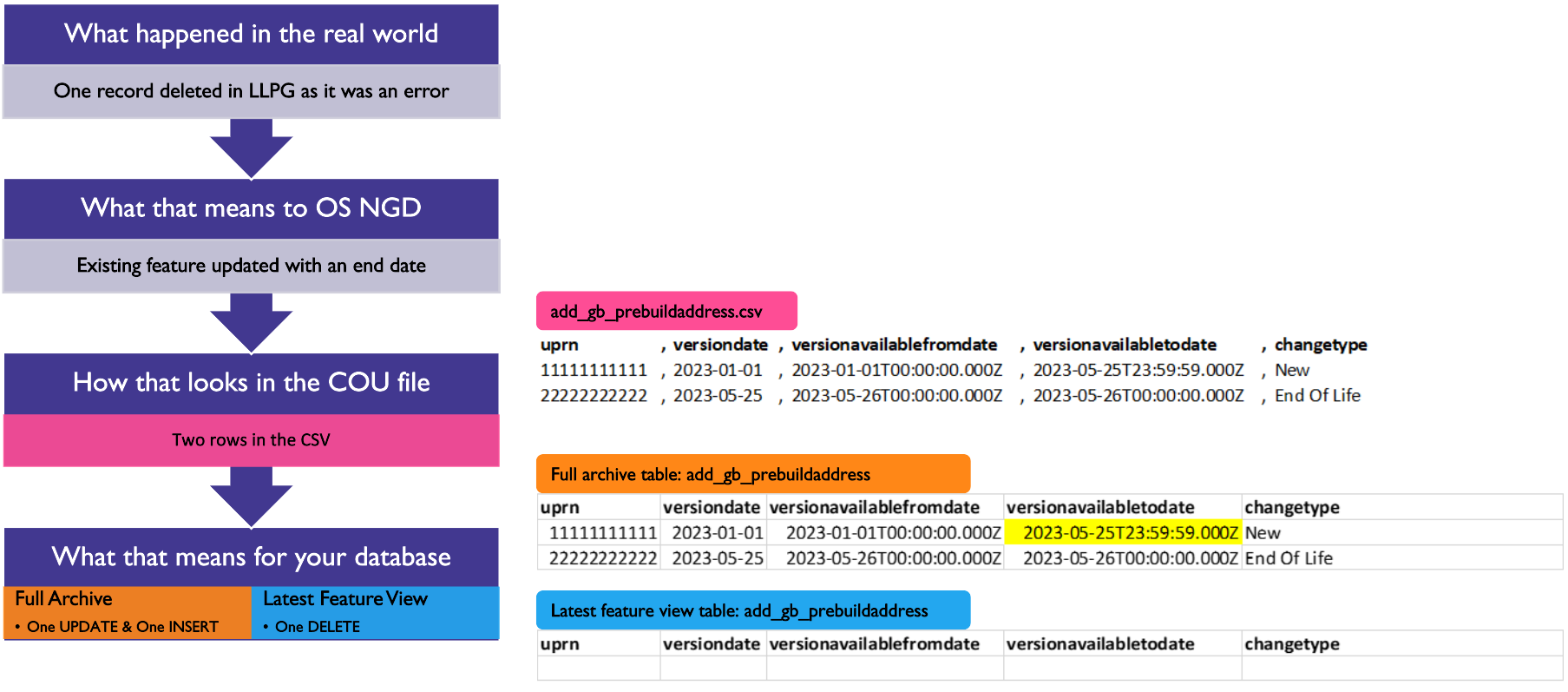
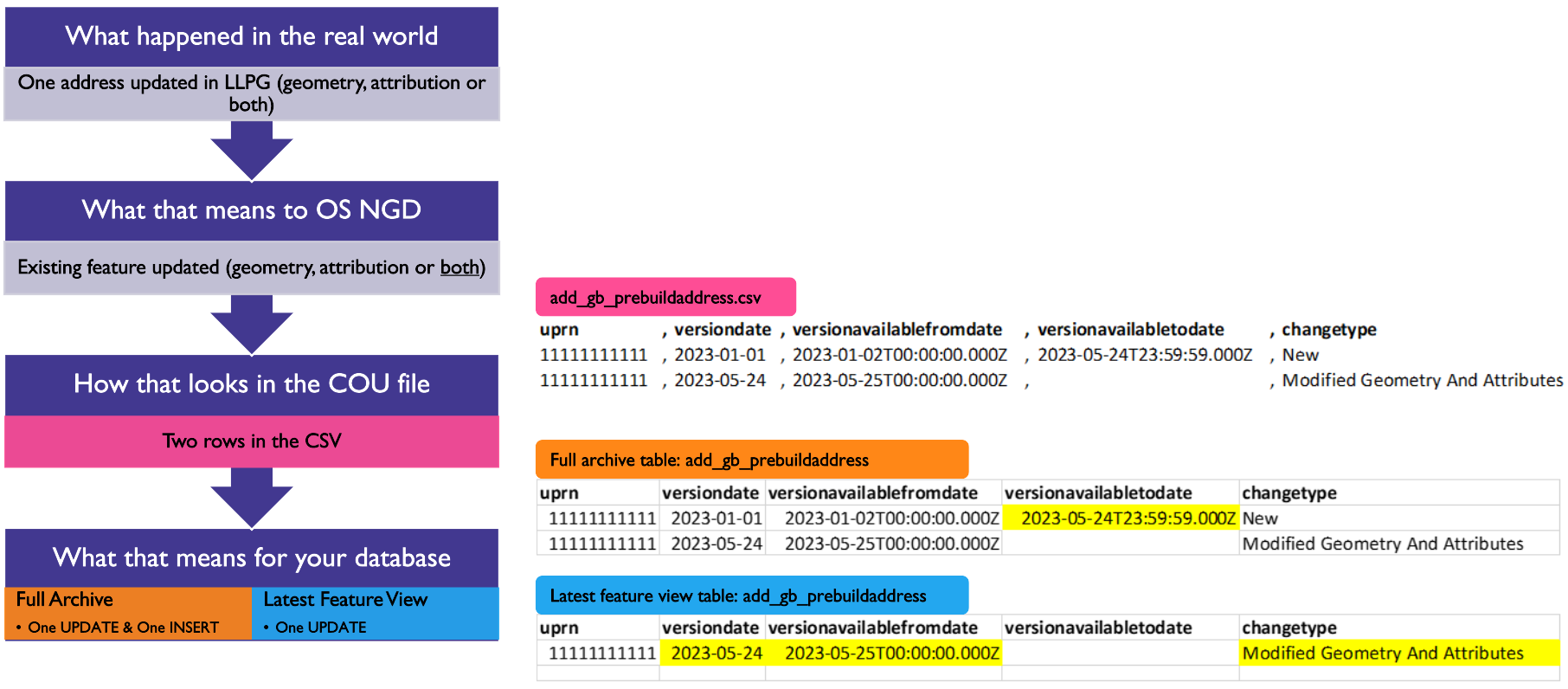
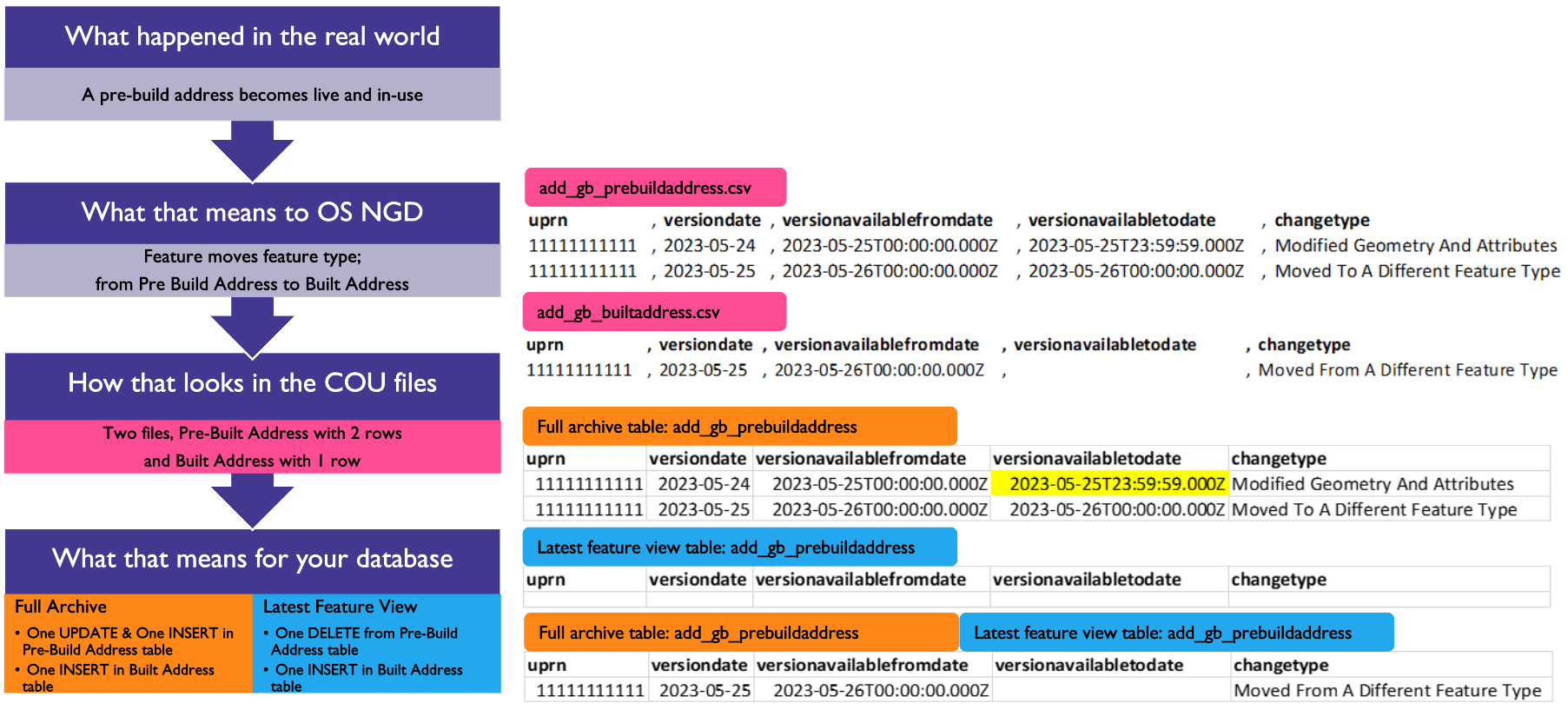
In the following examples, follow the flow chart down on the left and at each stage the correspondingly coloured tables on the right are the entries in the data tables relating to that stage

### Example 1​ - Two new pre-build addresses are created in an LLPG

<figure><img src="https://3774974716-files.gitbook.io/~/files/v0/b/gitbook-x-prod.appspot.com/o/spaces%2FzIfdYInJITdcxaLLMhlD%2Fuploads%2Fgit-blob-cfd570b39b6d2bb6ba333ecbbb4eaaaf9cfac9f1%2Fngd-cou-example-1.png?alt=media" alt="flow diagram and image for when 2 new pre-build addresses are created in an LLPG"><figcaption></figcaption></figure>

### Example 2 - One record deleted in an LLPG because it was an error

<figure><img src="https://3774974716-files.gitbook.io/~/files/v0/b/gitbook-x-prod.appspot.com/o/spaces%2FzIfdYInJITdcxaLLMhlD%2Fuploads%2Fgit-blob-9cc4b28d4f949ec5c43f3bb7e06fda2673570a3b%2Fngd-cou-example-2.png?alt=media" alt="Flow diagram for when one record deleted in an LLPG because it was an error"><figcaption></figcaption></figure>

### Example 3 - One address updated in LLPG (geometry, attribution or both)

<figure><img src="https://3774974716-files.gitbook.io/~/files/v0/b/gitbook-x-prod.appspot.com/o/spaces%2FzIfdYInJITdcxaLLMhlD%2Fuploads%2Fgit-blob-0b1bc6f1175f76805f84d05daa5f4f0c4b152072%2Fngd-cou-example-3.png?alt=media" alt="Flow diagram showing one address updated in LLPG"><figcaption></figcaption></figure>

### Example 4 - A pre-build address becomes live and in-use​

<figure><img src="https://3774974716-files.gitbook.io/~/files/v0/b/gitbook-x-prod.appspot.com/o/spaces%2FzIfdYInJITdcxaLLMhlD%2Fuploads%2Fgit-blob-e3c70107a51a158bf5de35b70323a4e886bf315d%2Fngd-cou-example-4.png?alt=media" alt="Flow diagram showing a pre-build address becomes live and in-use"><figcaption></figcaption></figure>

## Important things to note

**Automate the process**: essential if doing daily!​

[**Currency of OS NGD data**](https://osngd.gitbook.io/osngd/getting-started/os-ngd-core-principles/os-ngd-data-ordering-and-currency#currency-of-os-ngd-data): The update frequency for the different OS NGD collections are not all daily, for example:​

* Transport Network: 1 month​
* Water Network: 3 months​
* Boundaries Collection: 6 months​

[**COU files can be empty**](https://osngd.gitbook.io/osngd/getting-started/os-ngd-core-principles/os-ngd-data-ordering-and-currency#update-files): COU files will contain any changes which have been made to the underlying data within the selected time frequency. If no changes have been made to a selected feature type of your choice, then you will receive a blank COU file.​

**Child components**: These are related tables including; cross reference, date time qualifier and related entities tables. These have no geometry and no ‘Change Type’ attributes. They have a unique id and also the unique reference of the ‘parent’ feature and its version date.​

* related entities table: add\_gb\_prebuildaddress\_altadd​
* unique id (primary key): alternateaddressid​
* Parent id (foreign key): uprn & featuretypeversiondate​

***

Links that may be useful:

{% embed url="<https://osngd.gitbook.io/osngd/>" %}

{% embed url="<https://osdatahub.os.uk/>" %}

This content has been developed from what was originally a Lightning Talk PowerPoint slide set. These slides are available to PSGA members to view and download from the [PSGA members area of the OS website](https://auth.ordnancesurvey.co.uk/my.policy)