> For the complete documentation index, see [llms.txt](https://docs.os.uk/more-than-maps/llms.txt). Markdown versions of documentation pages are available by appending `.md` to page URLs; this page is available as [Markdown](https://docs.os.uk/more-than-maps/data-demonstrators/os-ngd-data/os-ngd-versioning.md).
# OS NGD Versioning
A Lightning Talk
## What is OS NGD schema versioning?
Ordnance Survey is implementing schema versioning to OS NGD feature types to allow the easy flow of data updates to each data theme.
For example:
* For the release of a new feature type in OS NGD: This will always be Version 1 (V1). The data never existed in OS NGD before, and this is therefore the first version. This will be Feature Type V1
* For the release of a new schema to an existing feature type in OS NGD: The feature type already exists in OS NGD, so a new additional version is created which incorporates the updates that have been made. This will lead to Feature Type V2, V3 etc.
## Type of data releases
**New Schema** - The release of a new schema will cause a feature type to have a new version. A new schema is created when additional fields are added or when the addition or removal of attribution has occurred
**Data Enhancement** - The release of a data enhancement will not cause a feature type to have a new version. A data enhancement is when the existing data quality has been improved, but there are no changes to the fields or attribution specified in the dataset
**New Feature** - The release of a brand new feature will be known as version 1 of that feature type. A new feature will contain the original schema, and can be adapted by data enhancements
## What does versioning look like over time?
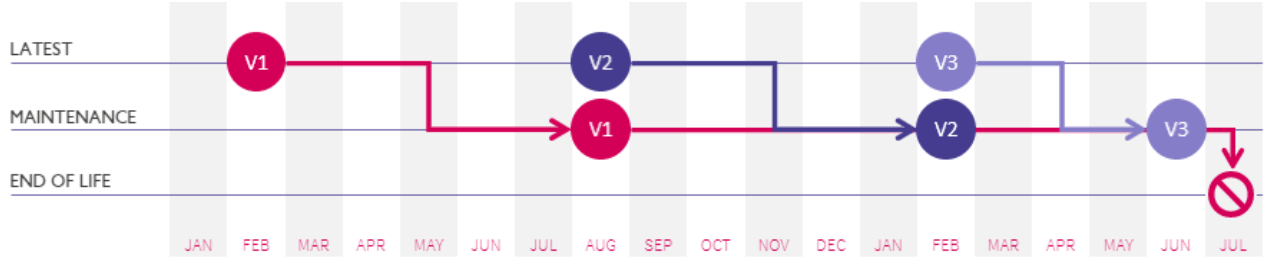
* As new data updates are made and released, the versioning will continue (V1, V2, V3 etc…)
* To manage versioning over time there will be a ‘latest’ version and ‘maintenance’ versions
* Once a new ‘latest’ version is released, the previous version will become a ‘maintenance’ version : V 1 – maintenance, V 2 – latest
* A maintenance version is still available in OS NGD and usable through OS Select+Build
* There will be no more than three versions available in OS NGD at any one time (one ‘Latest’ and up to two ‘Maintenance’ versions) : V 1 – Maintenance, V 2 – Maintenance, V 3 – Latest
* Once three versions have been released, Version 1 will be removed from OS NGD, and will no longer be available through OS Select+Build
## An example with OS NGD Address
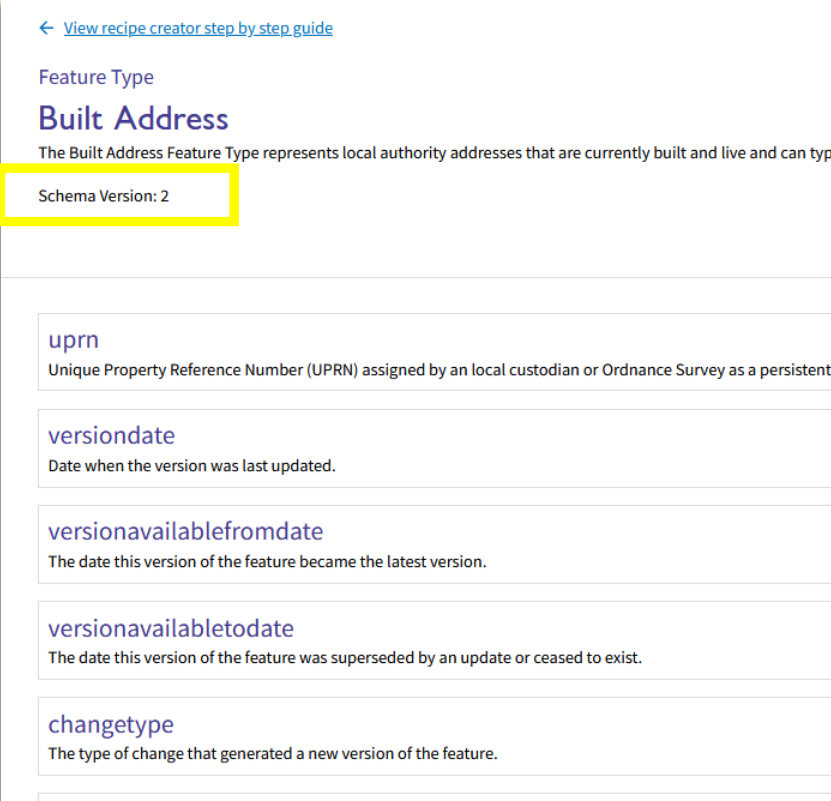
Built Address is a feature type found under the Address theme, and in the GB Address collection
It is an existing feature type which means it has a current Version number. As there hadn’t been any data updates since it was first released to OS NGD, it was released as Version 1
There have now been updates made to the Built Address schema as some new fields and attributions have been added
Updates to feature types are released in OS NGD updates (every 6 months – March or September)
When a new version is available the feature type, in this example we choose Built Address, and it defaults to the newest version available, which is then Version 2
### Recipes
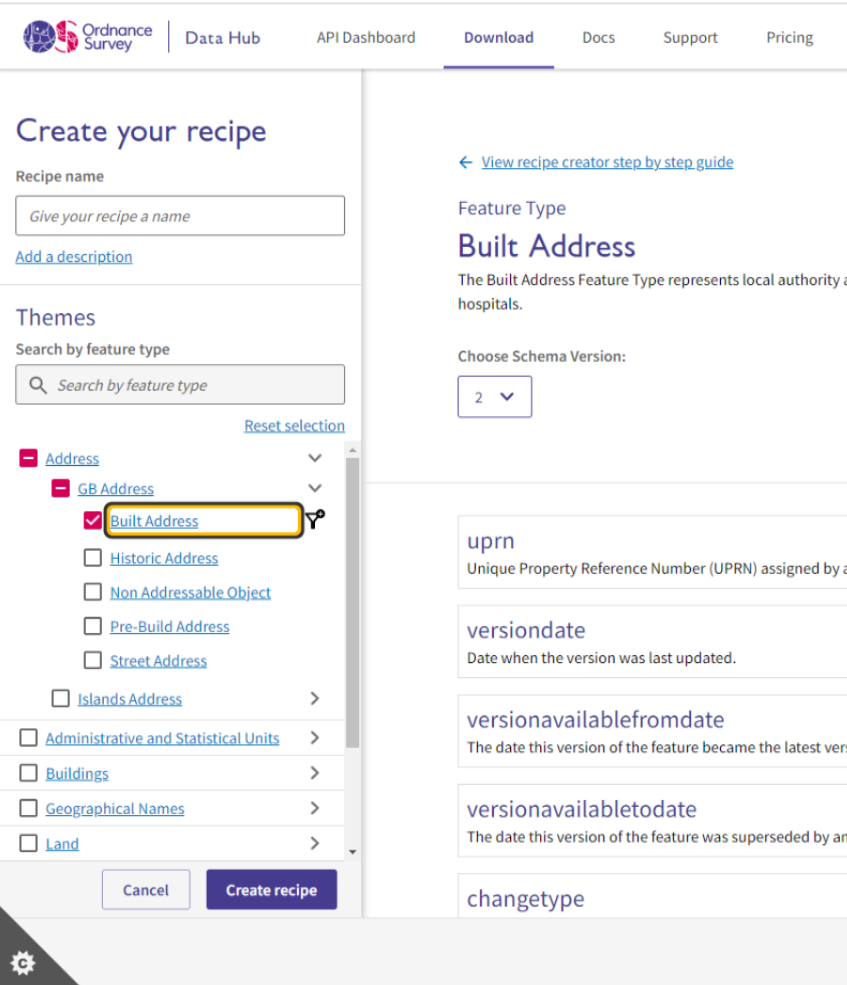
When a new version of the feature type is live, you can choose what version you want to download by selecting the feature type and choosing from the dropdown list. In this example we select Built Address and choose version 2
Version 1 is the Built Address feature type with the original schema containing the original fields and attribution (no new fields or attribution will be in this version)
Version 2 is the Built Address feature type with the new schema containing the original and new fields and attribution
You can find out what the new fields and attribution are by navigating to the National Geographic Database Platform on the OS Gitbook site
### Gitbook help
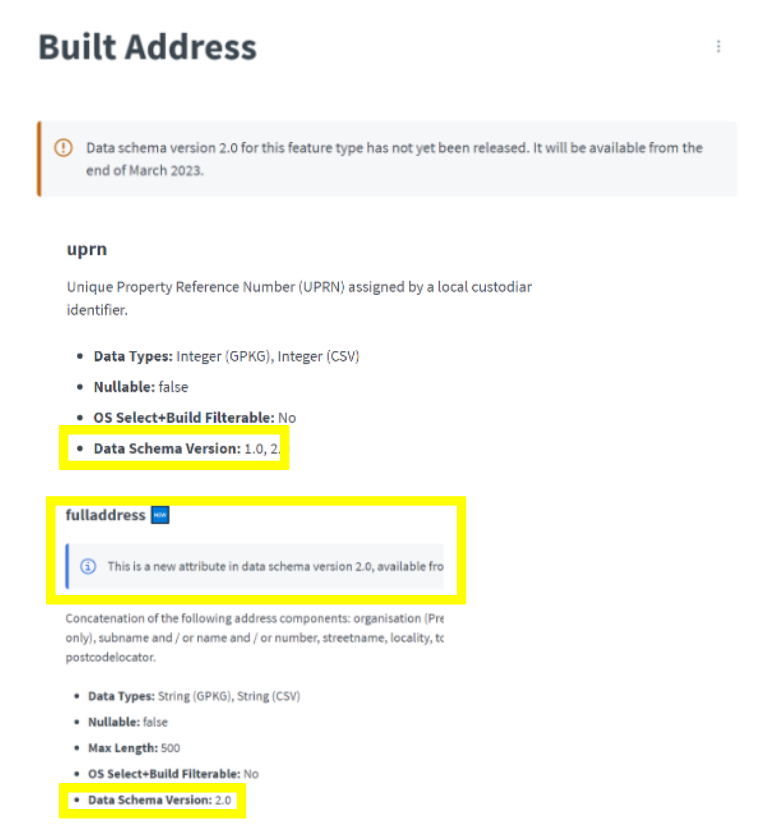
When a new schema version is released (or close to release), the OS NGD Platform on Gitbook will be updated
Using the OS NGD Address example; A notification will appear under the applicable Address feature types that are receiving updates and changes in the new version when a release is planned but not yet live
Under each field that is available within the feature type a new metadata point ‘Data Schema Version’ has been added which says what versions of this feature type has this field in it
For either new fields or fields receiving new attribution that are not in the original version but are in the new version, the ‘Data Schema Version’ will only specify the new version
### Versioning in the Recipe Library
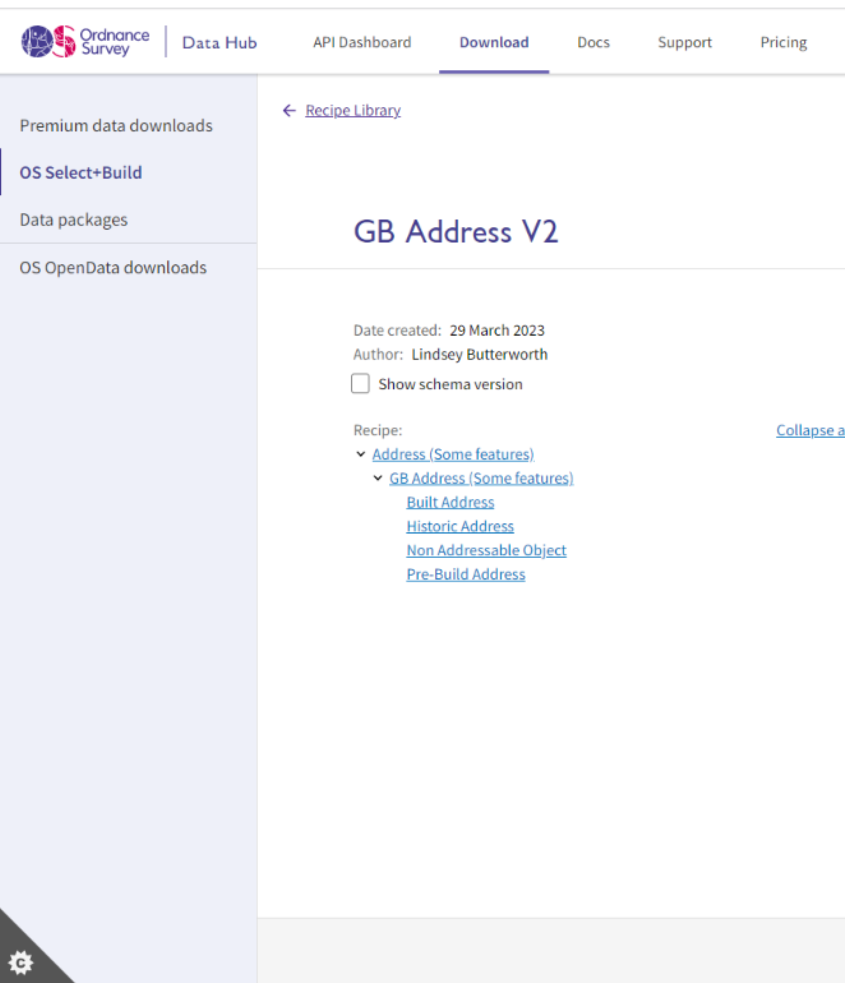
When viewing your recipe in the Recipe Library you can tick the box ‘Show schema version’ to view what version of the feature types are included in that recipe
## How will versioning affect you?
Advanced notice will be given if there are plans to make an update and create a new feature type schema version
Sample schemas will be made available to ensure customers can understand and support it. Information will be made available via our Gitbook page [OS NGD Documentation ](https://osngd.gitbook.io/osngd/)[Platform](https://osngd.gitbook.io/osngd/) and updated SQL DDL via Github OS NGD Resources
There is no immediate requirement for customers to adopt a feature type’s new schema version
12 months or more notice will be given if there are plans to remove a version from OS NGD and therefore make it no longer accessible
Customers will need to create a new recipe in OS Select+Build to use the new feature type version
When customers view a recipe in their recipe library there will be an option to view the feature type versions that are included
***
Links that may be useful:
{% embed url="" %}
{% embed url="" %}
{% embed url="" %}
This content has been developed from what was originally a Lightning Talk PowerPoint slide set. These slides are available to PSGA members to view and download from the [PSGA members area of the OS website](https://auth.ordnancesurvey.co.uk/my.policy)
---
# Agent Instructions
This documentation is published with GitBook. GitBook is the documentation platform designed so that both humans and AI agents can read, navigate, and reason over technical content effectively. Learn more at gitbook.com.
## Querying This Documentation
If you need additional information that is not directly available in this page, you can query the documentation by asking a question.
Perform an HTTP GET request on the following URL with the `ask` and `goal` query parameters:
```
GET https://docs.os.uk/more-than-maps/data-demonstrators/os-ngd-data/os-ngd-versioning.md?ask=&goal=
```
`ask` is the immediate question: it should be specific, self-contained, and written in natural language.
`goal` is what the user is ultimately trying to achieve, the reason they need the answer. Sharing it helps GitBook give you a better, more relevant answer. A goal is most helpful when it describes the outcome the user wants rather than restating the question. For example, with `ask=how do I create an API token`, a goal like `automate deployments from our CI pipeline` lets GitBook tailor the answer to that use case.
The response will contain a direct answer to the question and relevant excerpts and sources from the documentation.
Use this mechanism when the answer is not explicitly present in the current page, you need clarification or additional context, or you want to retrieve related documentation sections.