> For the complete documentation index, see [llms.txt](https://docs.os.uk/more-than-maps/llms.txt). Markdown versions of documentation pages are available by appending `.md` to page URLs; this page is available as [Markdown](https://docs.os.uk/more-than-maps/using-os-mapping-apis/using-os-ngd-in-cadcorp-sis-desktop-gis.md).
# Using OS NGD in Cadcorp SIS Desktop GIS
Below is an article created by one of our Partners, Martin Daly, Technical Director at [Cadcorp](https://www.cadcorp.com/), to help their users with getting going with OS NGD Data and APIs.
The content is of the article is entirely written by Cadcorp
## Introduction
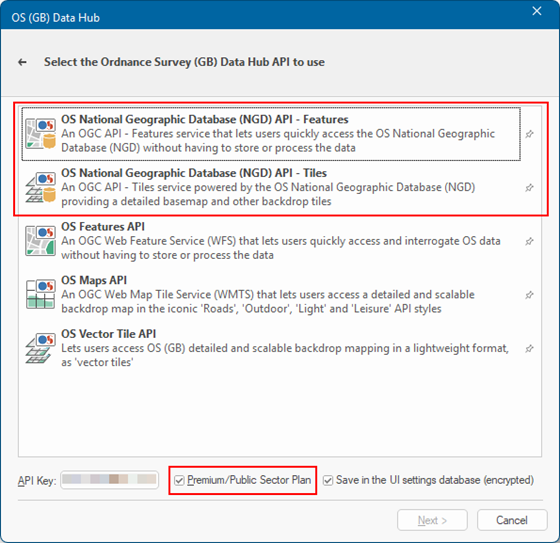
Cadcorp SIS Desktop provides extensive support for the OS Data Hub developed over the last 5 years. Support is provided for both the OS NGD API - Features and OS NGD API - Tiles on the OS (GB) Data Hub filter of the SIS Desktop *Add Overlay* wizard:
**Note**: The *API Key* provided **must** be for either the *Premium* or the *Public Sector* Plan; the free *Open Data* plan does not allow use of any OS NGD APIs.
## OS NGD API - Features
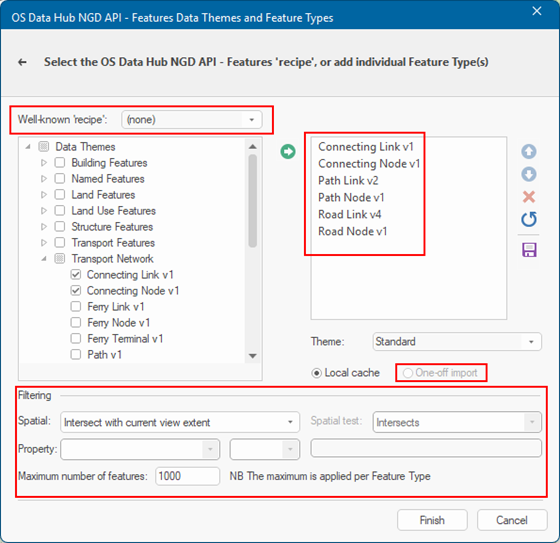
Clicking *Next* takes you to the dedicated OS NGD API - Features page:
Here you can see that the *feature* types are categorised by the aforementioned *theme*, and that expanding the tree for a *theme* (in this case Transport Network) shows the individual *feature types*. The list on the right-hand-side has been populated by selecting the required *feature types*, then clicking the green arrow to add them.
**Note**: The Transport Network *theme* has a *lot* of *feature types*, too many to fit in the available space, some of which have been updated since first release (the 'vX' on the end of the *feature type* name represents the version number, e.g. *Path Link* is at version *2*). So far these *feature type* updates, have mostly been [adding more attributes](https://docs.os.uk/osngd/data-structure/buildings/building-features/building#data-schema-version-table), on top of the already extensive set, making the OS NGD features even *more* useful in even *more* cases.
The original implementation of the new UI, used styles cribbed from the OS-supplied [stylesheets](https://github.com/OrdnanceSurvey/osngd-resources/tree/main/styling/stylesheets) and offered a choice between 'Contextual' (a pre-defined set of *feature types*) and 'Analytical' (a user-selected set of *feature types*), on this page, based on the stylesheet [documentation](https://github.com/OrdnanceSurvey/osngd-resources/blob/main/styling/stylesheets/geoserver-stylesheets-sld/README.md). Using terminology from OS Select+Build, users can create, edit, select and save their favourite set of feature types to create ‘recipes’.
After choosing the desired *feature types*, down at the bottom of the page the user can decide how to *filter* the request. The default option, shown, is to limit the requests to the extent of current map view. Other options allow the user to pre-select a feature, eg an [LSOA boundary](https://www.data.gov.uk/dataset/fa883558-22fb-4a1a-8529-cffdee47d500/lower_layer_super_output_area_lsoa_boundaries) or a [Flood Zone](https://www.data.gov.uk/dataset/104434b0-5263-4c90-9b1e-e43b1d57c750/flood-map-for-planning-flood-zones1), and then filter the request to, for example, only return features that *Intersect* with the selected LSOA or Flood Zone. There's also the chance to impose an absolute limit on the number of features *per feature type* because the OS NGD API - Features like its predecessor the [OS Features API](https://docs.os.uk/os-apis/accessing-os-apis/os-features-api) is not intended as a vehicle for bulk downloading.
**Important**: In order to comply with the OS Data Hub [API Service Terms](https://osdatahub.os.uk/legal/apiTermsConditions) OS NGD features can only be cached locally for the duration of a SIS Desktop session, and so the *One-off import* option is not enabled.
The eagle-eyed among you will have noticed that a lot of this is *very* similar to what SIS Desktop can do with the OS Features API. In fact the wizard page for the predecessor service looks more or less identical. But. There is a *huge* advantage in that the new API allows SIS Desktop to request the 'queryables' for a *feature type* (the set of attributes that can be used for queries), *and* the fixed set of well-known values for those attributes, where relevant. That allows SIS Desktop to offer auto-completion, like so, making query-building trivially easy:
No more having to remember if it is "Wood Or Timber" or "Timber Or Wood"!
These *queryables* open up a host of use-cases, eg:
Find multi-storey car parks
* Using the [description](https://docs.os.uk/osngd/data-structure/buildings/building-features/building-part#description) attribute of the [Building Part](https://docs.os.uk/osngd/data-structure/buildings/building-features/building-part) *feature type*, which has a [fixed set](https://docs.os.uk/osngd/code-lists/code-lists-overview/buildingpartdescriptionvalue) of known values
* e.g. for fire services to identify and assess risks following the [October 2023 fire](https://www.bbc.co.uk/news/uk-england-beds-bucks-herts-67073446) at Luton Airport
Find high-rise buildings
* Using [Building Heights](https://docs.os.uk/more-than-maps/demonstrators/os-ngd-national-geographic-database/os-ngd-buildings/building-part-and-building-line-feature-types#building-heights)
* e.g. for fire regulations
Find self-contained basement flats
* Using [Basement Presence Self Contained](https://docs.os.uk/osngd/using-os-ngd-data/os-ngd-buildings/building-attribution#basement-presence-self-contained)
* eg to query against flood risk
Find areas of grass
* Using the [description](https://docs.os.uk/osngd/data-structure/land/land-features/land#description) attribute of the [Land](https://docs.os.uk/osngd/data-structure/land/land-features/land) feature type, which also has a [fixed set](https://docs.os.uk/osngd/code-lists/code-lists-overview/landdescriptionvalue)
* eg to use as a starting point for establishing a grounds maintenance dataset
And many, many more
## OS NGD API - Tiles
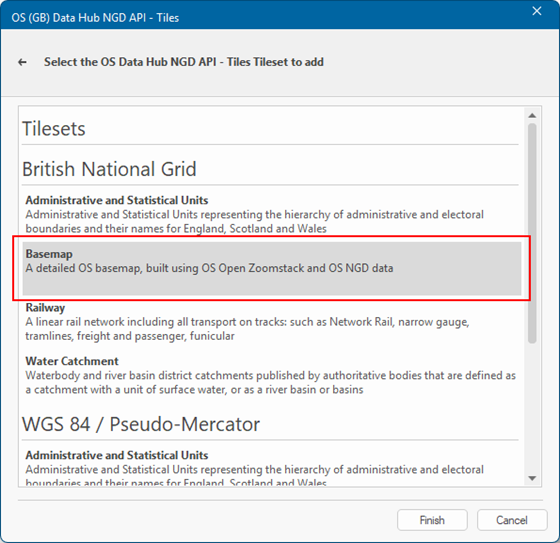
The OS NGD API - Tiles wizard page is a great deal simpler:
Pick the Coordinate Reference System that you want to use (*British National Grid* or Google Maps-like *WGS84 / Pseudo Mercator*), and then pick the 'Tileset' you are interested in. It seems safe to assume that the *Basemap* Tileset, highlighted in the screenshot, will be the most widely-used, so you should probably start there.
## Putting it all together
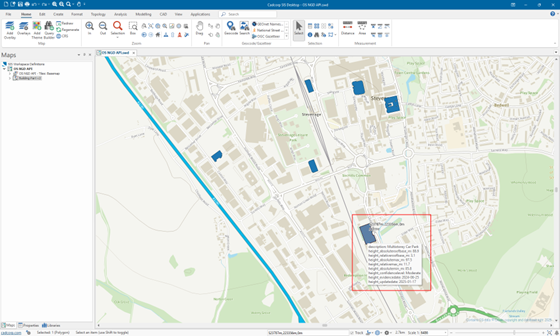
Here's SIS Desktop showing the *Basemap* Tileset from the OS NGD API - Tiles centred on the Cadcorp office in Stevenage, with all of the multi-storey car-parks queried from the OS NGD API - Features (highlighted in dark blue, instead of the standard yellow-ish). The MapTip® on the bottom-most car park shows the multiple height-related attributes - a tiny sample of the plethora of attributes that are available:
## OS Select+Build
The OS NGD API - Tiles and OS NGD API - Features are, as you have seen, extremely useful and extremely powerful. However, they are not suitable for all use-cases. In particular, large and *very large* volumes of data are best downloaded using OS Select+Build.
OS have provided really good, comprehensive [documentation](https://docs.os.uk/osngd/getting-started/downloading-with-os-select+build) on how to use OS Select+Build, and if you have not used it before that is an excellent place to start.
What you get from OS Select+Build is one or more data files in your chosen format. For most *feature types*, [OGC GeoPackage](https://www.geopackage.org/) will be the natural format to use.
You might want to use an alternative such as [comma-separated values (CSV)](https://docs.os.uk/osngd/getting-started/downloading-with-os-select+build/getting-started-with-csv) if your data is point-based, eg addresses, *and* your workflow uses spreadsheet software (within reason - there will be limits on the number of rows that you can use in practice), *or* involves loading directly into a non-spatial database.
Be aware that when OS Select+Build offers data in "one or more data files" this can mean *almost forty* different *feature types* - and therefore GeoPackage files - for the Transport theme alone. Managing this many related files isn't always easy, so SIS Desktop provides a simple utility to merge them all into a single GeoPackage. Even then, the tables have complex relationships, with, for example topological "Links" having references to topological "Nodes" (by the new *osid* attribute, RIP the [TOID](https://en.wikipedia.org/wiki/TOID)).
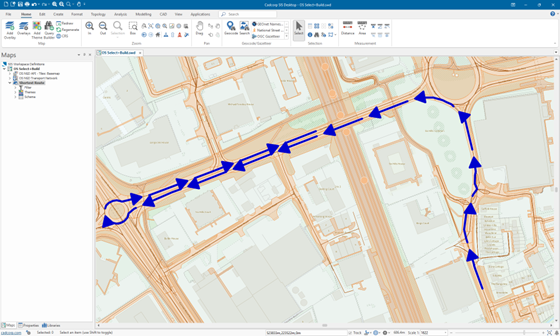
SIS Desktop is clever enough to be able to put Humpty Dumpty together again for the topological Transport and Network themes, just by pointing the *Add Overlay* wizard at either a single merged GeoPackage file, or a folder full of related files. Doing so rebuilds the topological network from the multiple tables or files, and gives you a ready-to-go routable network.
Here's a trivially simple route between two points on the network near the Cadcorp office in Stevenage (with the OS Select+Build data loaded from multiple files in a single folder, and in the standard styling, and OS NGD API - Tiles in the background faded to make the vector data 'pop'), showing that the network is fully connected and has network restrictions, eg one-way, etc:
## Summary
If you have not started using the OS NGD, either via the APIs or via OS Select+Build downloads, then there is no time like the present. Having the right tools that can make either route both familiar and easy-to-use will make your transition smoother.
Once again, like [the last time](https://www.ordnancesurvey.co.uk/blog/os-data-hub-to-desktop-gis), there's no doubt that OS's investment has been significant, and also no doubt that OS NGD will be the basis of increasing numbers of OS products, with diverse means of access, now and in the future.
---
# Agent Instructions
This documentation is published with GitBook. GitBook is the documentation platform designed so that both humans and AI agents can read, navigate, and reason over technical content effectively. Learn more at gitbook.com.
## Querying This Documentation
If you need additional information that is not directly available in this page, you can query the documentation by asking a question.
Perform an HTTP GET request on the following URL with the `ask` and `goal` query parameters:
```
GET https://docs.os.uk/more-than-maps/using-os-mapping-apis/using-os-ngd-in-cadcorp-sis-desktop-gis.md?ask=&goal=
```
`ask` is the immediate question: it should be specific, self-contained, and written in natural language.
`goal` is what the user is ultimately trying to achieve, the reason they need the answer. Sharing it helps GitBook give you a better, more relevant answer. A goal is most helpful when it describes the outcome the user wants rather than restating the question. For example, with `ask=how do I create an API token`, a goal like `automate deployments from our CI pipeline` lets GitBook tailor the answer to that use case.
The response will contain a direct answer to the question and relevant excerpts and sources from the documentation.
Use this mechanism when the answer is not explicitly present in the current page, you need clarification or additional context, or you want to retrieve related documentation sections.