> For the complete documentation index, see [llms.txt](https://docs.os.uk/os-downloads/llms.txt). Markdown versions of documentation pages are available by appending `.md` to page URLs; this page is available as [Markdown](https://docs.os.uk/os-downloads/products/areas-and-zones-portfolio/os-open-built-up-areas/os-open-built-up-areas-technical-specification/supply-formats.md).

# Supply formats

OS Open Built Up Areas is supplied in GeoPackage (.gpkg) and comma-separated values (CSV) Supply formats.

### GeoPackage <a href="#id-3.1-geopackage" id="id-3.1-geopackage"></a>

GeoPackage is an open, non-proprietary, platform-independent, standards-based data format for geographic information systems (GIS), as defined by the Open Geospatial Consortium (OGC). It is designed to be a lightweight format that can contain large amounts of varied and complex data in a single, easy to distribute and ready to use file. GeoPackage is natively supported by numerous software applications.

GeoPackage offers users the following benefits:

* The single file is easy to transfer and offers the end user a rich experience.
* Attribute names are not limited in length, making the format user friendly.
* The file size limit is large at 140 TB.

  <div data-gb-custom-block data-tag="hint" data-style="info" class="hint hint-info"><p><em>A file size limit could be imposed by the file system to which the file is written.</em></p></div>

  \* It supports raster, vector and database formats, making it a highly versatile solution.
* It is an OGC standard.
* In most cases, it is a plug-and-play format.

For information on how to open, use and understand a GeoPackage dataset, please refer to our [Getting Started with GeoPackage guide](https://docs.os.uk/os-downloads/resources/product-resources/getting-started-with-geopackage-and-vector-tiles-guides/getting-started-with-geopackage). For further information on GeoPackage, please see the [GeoPackage website](https://www.geopackage.org/).

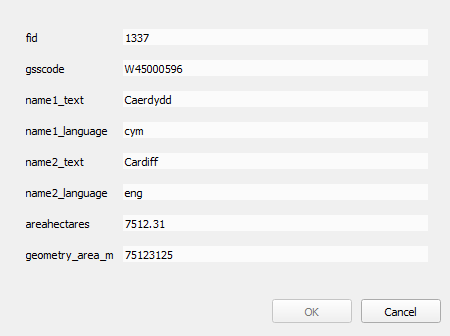
<figure><img src="https://1897589978-files.gitbook.io/~/files/v0/b/gitbook-x-prod.appspot.com/o/spaces%2FcNpJpLP8RROUaWVQo5ea%2Fuploads%2Fz7c56IiBDAZLM8EyWj6o%2F5.png?alt=media" alt="GeoPackage attributes for the Built Up Areas Feature Type."><figcaption><p>GeoPackage attributes for the Built Up Areas Feature Type.</p></figcaption></figure>

### CSV <a href="#id-3.2-csv" id="id-3.2-csv"></a>

A comma-separated values (CSV) file is a common interchange format for spreadsheets and databases that facilitates the simplistic use of data. Each field is either textual or numeric. Within the CSV, each field is separated from the next by a comma. CSV file format is universally supported for easy ingestion into all major database products.

{% hint style="info" %}
*CSV files are designed to be opened in a database or GIS application and opening them in other software applications might corrupt the data. In particular, Excel has a row limit that is easily exceeded by large CSV files. We recommend that you load CSV files directly into a database or GIS, rather than trying to open these files in Excel.*
{% endhint %}

The CSV supply has the following features:

* Geometry is provided as Well-Known Text (WKT).
* Header rows are included in each file.
* There is one record per line in each file.
* Fields are separated by commas.
* Where string fields contain commas, they are delimited by double quotes.
* Double quotes inside strings are escaped by doubling.
* Records are terminated by carriage returns and line feeds.
* Files use UTF-8 character encoding.

### Attribute naming format comparison <a href="#id-3.3-attribute-naming-format-comparison" id="id-3.3-attribute-naming-format-comparison"></a>

The names of attributes in CSV and GeoPackage format are very similar. The following table maps CSV attribute names to GeoPackage attribute names:

| CSV attributes          | GeoPackage attribute    |
| ----------------------- | ----------------------- |
| \*                      | fid                     |
| gsscode \*\*            | gsscode \*\*            |
| relatedtogsscode \*\*\* | relatedtogsscode \*\*\* |
| name1\_text             | name1\_text             |
| name1\_language         | name1\_language         |
| name2\_text             | name2\_text             |
| name2\_language         | name2\_language         |
| areahectares            | areahectares            |
| geometry\_area\_m       | geometry\_area\_m       |
| geometry \*\*\*\*       | \*                      |

\* Indicates that the attribute is not mapped between the formats.

{% hint style="info" %}
fid is an additional attribute. It is an INTEGER NOT NULL column that acts as a primary key. This attribute is a requirement of the OGC GeoPackage specification.
{% endhint %}

{% hint style="info" %}
The geometry column is always the second column, but the attribute (or its value) is typically not visible in GIS software. GeoPackage is based on Well-Known Binary (WKB) as defined in ISO/IEC 13249-3:2011.
{% endhint %}

\*\* Present in the Built Up Areas Feature Type only.

\*\*\* Present in the Built Up Extents and Non-Built Up Extents Feature Types only.

\*\*\* CSV contains the Well-Known Text (WKT) data type that represents the vector geometry objects of the feature.


---

# Agent Instructions
This documentation is published with GitBook. GitBook is the documentation platform designed so that both humans and AI agents can read, navigate, and reason over technical content effectively. Learn more at gitbook.com.

## Querying This Documentation
If you need additional information that is not directly available in this page, you can query the documentation dynamically by asking a question.

Perform an HTTP GET request on the current page URL with the `ask` query parameter, and the optional `goal` query parameter:

```
GET https://docs.os.uk/os-downloads/products/areas-and-zones-portfolio/os-open-built-up-areas/os-open-built-up-areas-technical-specification/supply-formats.md?ask=<question>&goal=<endgoal>
```

`ask` is the immediate question: it should be specific, self-contained, and written in natural language.
`goal` is optional and describes the broader end goal you are ultimately trying to accomplish on behalf of the user. GitBook uses it to tailor the answer towards what is most useful for that goal.

The response will contain a direct answer to the question and relevant excerpts and sources from the documentation.

Use this mechanism when the answer is not explicitly present in the current page, you need clarification or additional context, or you want to retrieve related documentation sections.