# OS MasterMap Topography Layer – Building Height Attribute Documentation

OS MasterMap Topography Layer – Building Height Attribute is an enhancement to, and forms part of, the [OS MasterMap Topography Layer](https://docs.os.uk/os-downloads/products/buildings-and-infrastructure-portfolio/broken-reference) product. It provides building height properties to help manage assets, plan works and visualise urban density. To use the Building Height Attribution data, it must first be joined to the OS MasterMap Topography Layer holding using the topographic identifiers (TOIDs), as detailed in the [Getting Started Guide](https://docs.os.uk/os-downloads/products/buildings-and-infrastructure-portfolio/os-mastermap-topography-layer-building-height-attribute/os-mastermap-topography-layer-building-height-attribute-getting-started-guide).

{% hint style="info" %}
**This product is updated every six months in April and October.**
{% endhint %}

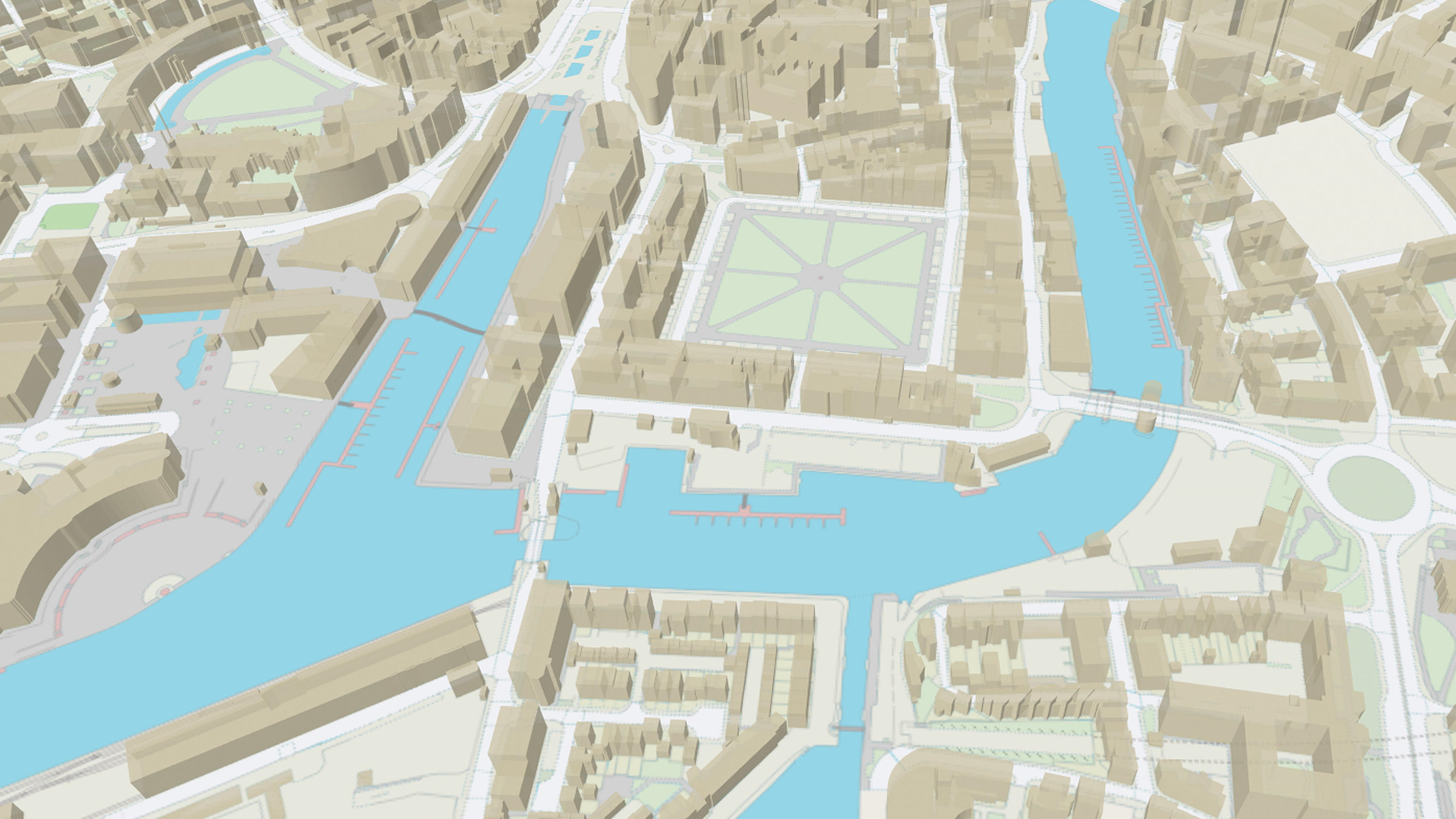
<figure><img src="https://1897589978-files.gitbook.io/~/files/v0/b/gitbook-x-prod.appspot.com/o/spaces%2FcNpJpLP8RROUaWVQo5ea%2Fuploads%2FBOP0xYrQyS27g1cXtDIb%2Fimage.png?alt=media&#x26;token=90a5b7f6-371a-47dd-9825-a11c59f20984" alt="Representation of OS MasterMap Building Height attribute data showing a 3D visualisation of multi-story buildings in a built up area"><figcaption><p>Representation of OS MasterMap Topography Layer – Building Height Attribute data.</p></figcaption></figure>

{% tabs %}
{% tab title="Benefits" %}
**Enhancement to OS MasterMap Topography Layer**

Building Height Attribute is an enhancement to, and forms part of, [OS MasterMap Topography Layer](https://docs.os.uk/os-downloads/products/buildings-and-infrastructure-portfolio/broken-reference). It provides a set of height attributes with a buildings theme within OS MasterMap Topography Layer. It has further been enhanced with the inclusion of tanks, chimney stacks and glasshouses.

**Compatible with other layers of OS MasterMap and other OS products**

Building Height Attribute can be integrated with other OS products, such as [OS Terrain 5](https://docs.os.uk/os-downloads/products/land-and-terrain-portfolio/os-terrain-5) and [OS MasterMap Imagery Layer](https://docs.os.uk/os-downloads/products/maps-and-imagery-portfolio/os-mastermap-imagery-layer).

**3D visualisations of buildings and structures**

This product has been developed in response to customer demand for height information for buildings and select structures. It can be used to make simple 3D visualisations of buildings and structures and can be used to assist a range of analytical applications across both public and commercial sectors.

**Used for energy and infrastructure**

Building Height Attribute can be used to model heat loss, regulate requirements including high-rise gas safety, help with smart meter roll-out and perform line of sight analysis for small cell planning. It can also help to manage overhead cable routing and assist in planning and maintaining water pressure to high-rise properties.

**Suitable for architects and development projects**

This enhancement to OS MasterMap Topography Layer can also aid architects to visualise building designs early in the planning phase. It also models the impact of development projects rapidly and can help in emergency planning and risk assessment, by allowing the appropriate resources to be deployed more rapidly.

**Suitable for government and Emergency Services use**

OS MasterMap Building Height Attribute data can also be used by the government for modelling air pollution, siting solar panels, visualising planning applications in the context of surrounding buildings and also for urban density. Emergency Services can also use it to know when and where to deploy specialist equipment.
{% endtab %}

{% tab title="Use Cases" %}
OS MasterMap Topography Layer – Building Height Attribute can be used to make simple 3D visualisations of buildings and structures to:

* Model heat loss
* Regulate requirements
* Help with smart meter roll-out
* Analyse line of sight for small cell planning
* Manage overhead cable routing
* Assist in planning and maintaining water pressure to high-rise properties
* Visualise building designs early in the planning phase
* Help in emergency planning and risk assessment
* Model air pollution
* Site solar panels
* Visualise planning applications
  {% endtab %}

{% tab title="Summary" %}

* **Access:** Download via the [OS Data Hub](https://osdatahub.os.uk/)
* **Data theme:** Buildings
* **Data structure:** Vector – Polygons
* **Coverage:** Great Britain
* **Scale:** 1:1 250 to 1:10 000
* **Format:** CSV
* **Ordering area:** All of Great Britain or customisable area (5km² tiles)
* **Publication months:** April, October
  {% endtab %}
  {% endtabs %}

## How to get this product

Access to this product is free for Public Sector Geospatial (Agreement) PSGA Members. You can [check if your organisation is a member of the PSGA on the OS website](https://www.ordnancesurvey.co.uk/customers/public-sector/psga-member-finder).

The [OS MasterMap Topography Layer – Building Height Attribute product page on the OS website](https://www.ordnancesurvey.co.uk/products/os-mastermap-building-height-attribute) has advice on how to get the product for developers, businesses, OS Partners and PSGA Members (i.e. government and the public sector).

## Sample data <a href="#sample-data" id="sample-data"></a>

### Download OS MasterMap Topography Layer – Building Height Attribute sample data <a href="#download-os-egs-sample-data" id="download-os-egs-sample-data"></a>

You can download sample data for the product for free from the [OS Data Hub](https://osdatahub.os.uk/data/downloads/sample/BLDHDL). The sample data is available in CSV format and covers one area (Exeter).

## What's next?

To access additional documentation and resources relating to this product, please refer to the following:

<table data-view="cards"><thead><tr><th></th><th></th><th data-hidden data-card-cover data-type="image">Cover image</th><th data-hidden data-card-target data-type="content-ref"></th></tr></thead><tbody><tr><td><h4>Overview</h4></td><td>The overview introduces OSMM Topography Layer – BHA and gives context for all users – highlighting key features, providing examples of potential uses, and listing details such as file sizes.</td><td data-object-fit="cover" data-alt="Example image showing OS MasterMap Topography Layer – Building Height Attribute product data over a background map."><a href="https://1897589978-files.gitbook.io/~/files/v0/b/gitbook-x-prod.appspot.com/o/spaces%2FcNpJpLP8RROUaWVQo5ea%2Fuploads%2FhESsEztBwZowCgSQFBsK%2FMasterMap-Topography-And-Building-Heights-1.PNG?alt=media&#x26;token=35473673-a941-4a63-af9b-58809f0cceed">MasterMap-Topography-And-Building-Heights-1.PNG</a></td><td><a href="os-mastermap-topography-layer-building-height-attribute/os-mastermap-topography-layer-building-height-attribute-overview">os-mastermap-topography-layer-building-height-attribute-overview</a></td></tr><tr><td><h4>Getting Started Guide</h4></td><td>The getting started guide provides instructions for using OSMM Topography Layer – BHA in different software applications. Users with limited technical knowledge will be able to follow this guide.</td><td data-object-fit="cover" data-alt="Example image showing OS MasterMap Topography Layer – Building Height Attribute product data over a background map."><a href="https://1897589978-files.gitbook.io/~/files/v0/b/gitbook-x-prod.appspot.com/o/spaces%2FcNpJpLP8RROUaWVQo5ea%2Fuploads%2F0r6Sp1CKhq90dfGBabMp%2FMasterMap-Topography-And-Building-Heights-2.PNG?alt=media&#x26;token=ea35a13d-4a5a-441d-ab11-ebb2a4915a5d">MasterMap-Topography-And-Building-Heights-2.PNG</a></td><td><a href="os-mastermap-topography-layer-building-height-attribute/os-mastermap-topography-layer-building-height-attribute-getting-started-guide">os-mastermap-topography-layer-building-height-attribute-getting-started-guide</a></td></tr><tr><td><h4>Technical Specification</h4></td><td>The technical specification provides detailed technical information about OSMM Topography Layer – BHA. It is targeted at technical users and software developers.</td><td data-object-fit="cover" data-alt="Example image showing OS MasterMap Topography Layer – Building Height Attribute product data over a background map."><a href="https://1897589978-files.gitbook.io/~/files/v0/b/gitbook-x-prod.appspot.com/o/spaces%2FcNpJpLP8RROUaWVQo5ea%2Fuploads%2FhSPhK2hzA5D1qFuxq5ns%2FMasterMap-Topography-And-Building-Heights-3.PNG?alt=media&#x26;token=45b52064-26fb-4650-a645-57f7b31b2692">MasterMap-Topography-And-Building-Heights-3.PNG</a></td><td><a href="os-mastermap-topography-layer-building-height-attribute/os-mastermap-topography-layer-building-height-attribute-technical-specification">os-mastermap-topography-layer-building-height-attribute-technical-specification</a></td></tr><tr><td><h4>Downloads</h4></td><td>The downloads page provides links and resources to support the application of OSMM Topography Layer – BHA within your environment.</td><td></td><td><a href="os-mastermap-topography-layer-building-height-attribute/os-mastermap-topography-layer-building-height-attribute-downloads">os-mastermap-topography-layer-building-height-attribute-downloads</a></td></tr><tr><td><h4>Ordnance Survey Website</h4></td><td>View OSMM Topography Layer – BHA product information and find out how to get this product on the OS website.</td><td></td><td><a href="https://www.ordnancesurvey.co.uk/products/os-mastermap-building-height-attribute#overview">https://www.ordnancesurvey.co.uk/products/os-mastermap-building-height-attribute#overview</a></td></tr></tbody></table>

{% hint style="info" %}
New users should start with the Overview to gain high-level insights into the product. The Getting Started Guide will help you to begin using product data in different software systems. The Technical Specification contains detailed technical insights.
{% endhint %}
