> For the complete documentation index, see [llms.txt](https://docs.os.uk/os-downloads/llms.txt). Markdown versions of documentation pages are available by appending `.md` to page URLs; this page is available as [Markdown](https://docs.os.uk/os-downloads/products/buildings-and-infrastructure-portfolio/os-open-linked-identifiers/os-open-linked-identifiers-getting-started-guide/linked-identifiers.md).
# Linked identifiers
OS Open Linked Identifiers is aimed for use within database products only and consists of join tables that are supplied in the Comma Separated Variable (CSV) format. These files are not suitable for GIS packages as they are very large and do not contain any spatial information. This guide will cover the loading of an example linked ID CSV file into a typical database application.
Upon downloading the data, you will receive zip files of the 11 Linked Identifier relationships (see table below). The generalised naming convention for each Relationship ID is:
*{Data Identifier 1}\_{Feature Identifier 1}\_{Data Identifier 2}\_{Feature Identifier 2}\_{CorrelationType Number}*
For example: *BLPU\_UPRN\_RoadLink\_TOID\_9*
| Relationship IDs | Relationship |
| ---------------------------------------- | ---------------------------------------------- |
| RoadLink\_TOID\_TopographicArea\_TOID\_2 | RoadLink <-> TopographicArea |
| Road\_TOID\_TopographicArea\_TOID\_3 | Road <-> TopographicArea |
| Street\_USRN\_TopographicArea\_TOID\_4 | Street <-> TopographicArea |
| BLPU\_UPRN\_TopographicArea\_TOID\_5 | BLPU <-> TopographicArea |
| RoadLink\_TOID\_Road\_TOID\_7 | RoadLink <-> Road |
| RoadLink\_TOID\_Street\_USRN\_8 | RoadLink <-> Street |
| BLPU\_UPRN\_RoadLink\_TOID\_9 | BLPU <-> RoadLink |
| Road\_TOID\_Street\_USRN\_10 | Road <-> Street |
| BLPU\_UPRN\_Street\_USRN\_11 | BLPU <-> Street |
| ORRoadLink\_GUID\_RoadLink\_TOID\_12 | Open Roads RoadLink <-> OSMM Highways RoadLink |
| ORRoadNode\_GUID\_RoadLink\_TOID\_13 | Open Roads RoadNode <-> OSMM Highways RoadLink |
It is up to the end user to choose which Linked ID they wish to use. For further information for the purpose of each join table, please refer to the *OS Linked Identifiers Overview* document. This will depend on which dataset they wish to link to elements within OS data. It is NOT recommended to attempt to open the uncompressed .CSV files in an application such as Microsoft Excel, as the application will simply either hang or not load the data at all.
This is also the case if the user tries to load the Linked IDs directly into a GI application. The GI application will quite likely hang because the Linked IDs are large and contain no spatial information (geometry) and will therefore not be spatially indexed.
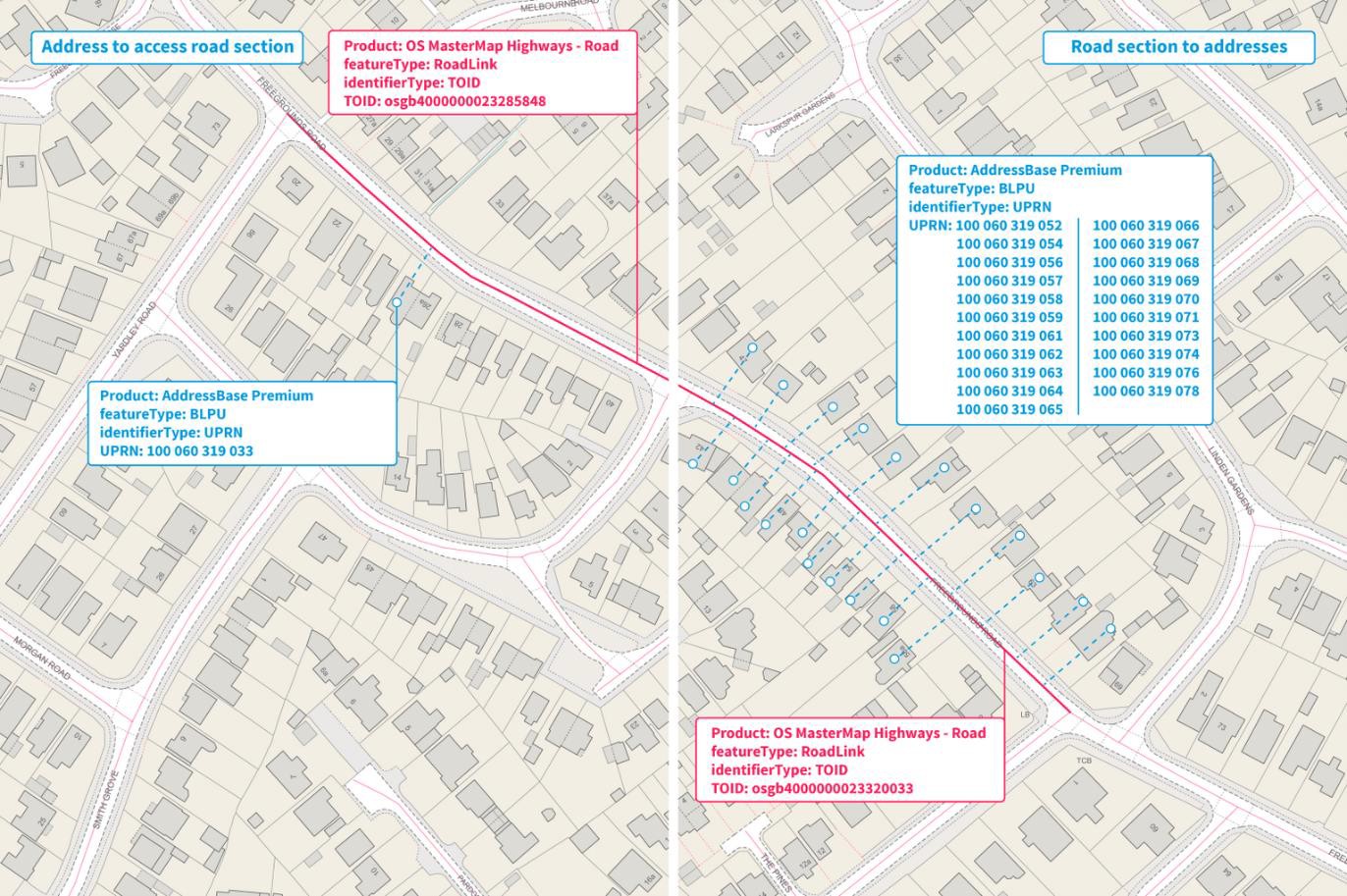
Using these Linked Identifiers from within a database will allow the user to achieve end results such as shown below. The results will depend on which user data they wish to link, and which OS dataset is being linked.
Linked identifier data
The use of Linked Identifiers will also be made available through an [API service](https://osdatahub.os.uk/docs/linkedIdentifiers/overview) which is not covered in this guide.
## Additional Support Information
Within each ZIP file containing the Linked Identifier data in CSV format, there is a JSON file. This file contains important information providing the epoch or publication date of the differing datasets used to create the Linked Identifiers. This information can be used to ensure synchronicity between the Ordnance Survey datasets that are being linked.
---
# Agent Instructions
This documentation is published with GitBook. GitBook is the documentation platform designed so that both humans and AI agents can read, navigate, and reason over technical content effectively. Learn more at gitbook.com.
## Querying This Documentation
If you need additional information that is not directly available in this page, you can query the documentation by asking a question.
Perform an HTTP GET request on the following URL with the `ask` and `goal` query parameters:
```
GET https://docs.os.uk/os-downloads/products/buildings-and-infrastructure-portfolio/os-open-linked-identifiers/os-open-linked-identifiers-getting-started-guide/linked-identifiers.md?ask=&goal=
```
`ask` is the immediate question: it should be specific, self-contained, and written in natural language.
`goal` is what the user is ultimately trying to achieve, the reason they need the answer. Sharing it helps GitBook give you a better, more relevant answer. A goal is most helpful when it describes the outcome the user wants rather than restating the question. For example, with `ask=how do I create an API token`, a goal like `automate deployments from our CI pipeline` lets GitBook tailor the answer to that use case.
The response will contain a direct answer to the question and relevant excerpts and sources from the documentation.
Use this mechanism when the answer is not explicitly present in the current page, you need clarification or additional context, or you want to retrieve related documentation sections.