> For the complete documentation index, see [llms.txt](https://docs.os.uk/os-downloads/llms.txt). Markdown versions of documentation pages are available by appending `.md` to page URLs; this page is available as [Markdown](https://docs.os.uk/os-downloads/products/land-and-terrain-portfolio/os-mastermap-sites-layer/os-mastermap-sites-layer-technical-specification/access-point-overview.md).
# Access point overview
An access point refers to a functionally designed and maintained location where pedestrians and/or vehicles can enter or leave a site. Access points are initially captured from a visual inspection of OS MasterMap Topography and Imagery Layers. Further access points can also be captured and maintained through customer feedback and field survey.
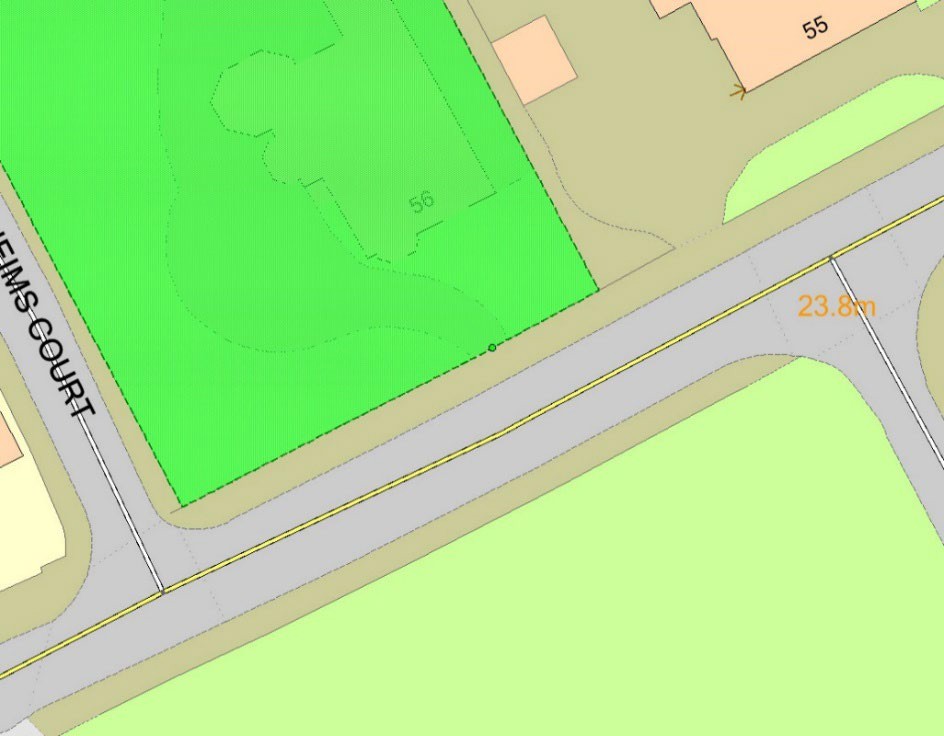
Access points are point features which have been positioned on the boundary of the functional site extent to which they belong (see figure below). There are circumstances where access points do not lie on the site boundary; for example, underground or obscured access into a site, and these will be captured in their true position or within five metres of the functional site extent boundary.
Where there are several access types that are located next to each other; for example, a road with a pavement on one or more sides, a single ‘combined access’ point will be created to indicate that it is possible to access the site by foot and by vehicle at that location.
Access points are linked to functional site extents during their capture. They can also retain additional access information such as height and time or vehicular restrictions. The access point also references the nearest OS Highways Network Layer link TOID. This allows the user to easily integrate the data with other OS Datasets such as the OS MasterMap Highways Network Layer.
Each access point will have its own unique TOID and will be subject to a managed life cycle process, controlled by changes to attributes as well as changes to its associated Functional Site’s attributes.
Some of the access points have restrictions which cannot be ascertained from aerial imagery. As such, they are not currently available in OS MasterMap Sites Layer. The attributes currently not populated have been greyed out in the attribute definitions table in the following section.
Example of an access point (green point)
---
# Agent Instructions
This documentation is published with GitBook. GitBook is the documentation platform designed so that both humans and AI agents can read, navigate, and reason over technical content effectively. Learn more at gitbook.com.
## Querying This Documentation
If you need additional information that is not directly available in this page, you can query the documentation by asking a question.
Perform an HTTP GET request on the following URL with the `ask` and `goal` query parameters:
```
GET https://docs.os.uk/os-downloads/products/land-and-terrain-portfolio/os-mastermap-sites-layer/os-mastermap-sites-layer-technical-specification/access-point-overview.md?ask=&goal=
```
`ask` is the immediate question: it should be specific, self-contained, and written in natural language.
`goal` is what the user is ultimately trying to achieve, the reason they need the answer. Sharing it helps GitBook give you a better, more relevant answer. A goal is most helpful when it describes the outcome the user wants rather than restating the question. For example, with `ask=how do I create an API token`, a goal like `automate deployments from our CI pipeline` lets GitBook tailor the answer to that use case.
The response will contain a direct answer to the question and relevant excerpts and sources from the documentation.
Use this mechanism when the answer is not explicitly present in the current page, you need clarification or additional context, or you want to retrieve related documentation sections.