> For the complete documentation index, see [llms.txt](https://docs.os.uk/os-downloads/llms.txt). Markdown versions of documentation pages are available by appending `.md` to page URLs; this page is available as [Markdown](https://docs.os.uk/os-downloads/products/land-and-terrain-portfolio/os-mastermap-sites-layer/os-mastermap-sites-layer-technical-specification/geometry.md).

# Geometry

This section defines the geometric data types used by features of the OS MasterMap Sites Layer. A UML diagram is used to support the data type descriptions.

## Features and spatial data types <a href="#bookmark47" id="bookmark47"></a>

The following table details the data type of the geometric attributes of OS MasterMap Site Layer features. Each feature type has a spatial attribute called ‘geometry’. The data type of this attribute is given in the third column of the table.

| Feature type   | Spatial attribute | Data type of geometry attribute | For details, see:                                                                                                                                                                                 |
| -------------- | ----------------- | ------------------------------- | ------------------------------------------------------------------------------------------------------------------------------------------------------------------------------------------------- |
| functionalSite | geometry          | Polygon                         | [Functional site extent overview](/os-downloads/products/land-and-terrain-portfolio/os-mastermap-sites-layer/os-mastermap-sites-layer-technical-specification/functional-site-extent-overview.md) |
| accessPoint    | geometry          | Point                           | [access point overview](https://docs.os.uk/os-apis/)                                                                                                                                              |
| routingPoint   | geometry          | Point                           | R[outing point overview](/os-downloads/products/land-and-terrain-portfolio/os-mastermap-sites-layer/os-mastermap-sites-layer-technical-specification/routing-point-overview.md)                   |

## Geometric data types <a href="#bookmark48" id="bookmark48"></a>

### Point <a href="#bookmark49" id="bookmark49"></a>

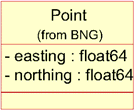
A point is used to specify a single horizontal location by a coordinate pair in a given spatial reference system.

**Example**

A point defined in the BNG reference system has easting and northing coordinates in units of metres, where the easting is in the range 0 to 700000 and the northing is in the range 0 to 1300000.

<figure><img src="https://1897589978-files.gitbook.io/~/files/v0/b/gitbook-x-prod.appspot.com/o/spaces%2FcNpJpLP8RROUaWVQo5ea%2Fuploads%2FYpmaibmrcK5Ogzhg9837%2F14.png?alt=media" alt="Point defined in the BNG reference system"><figcaption><p>Point defined in the BNG reference system</p></figcaption></figure>

<figure><img src="https://1897589978-files.gitbook.io/~/files/v0/b/gitbook-x-prod.appspot.com/o/spaces%2FcNpJpLP8RROUaWVQo5ea%2Fuploads%2FKyzpMpOJRslNasyXuaek%2F15.png?alt=media" alt="Example class model for point (from BNG)."><figcaption><p>Example class model for point (from BNG).</p></figcaption></figure>

**Example class model**

### Polygon <a href="#bookmark50" id="bookmark50"></a>

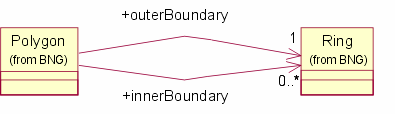
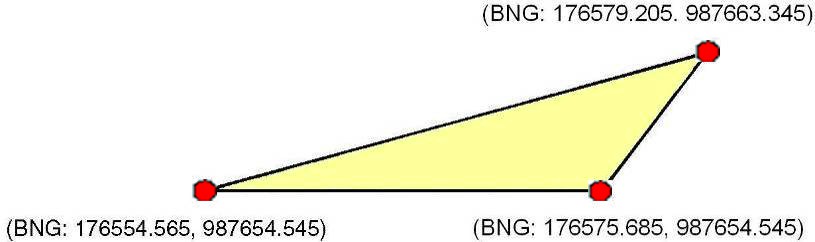
A polygon is a single closed region on the spatial reference system projection plane, defined by a set of geometric rings that represent the boundaries. A polygon has one outer boundary and zero or more inner boundaries (holes in the polygon). The inner boundaries must not cross each other or contain other inner boundaries. Coordinates in outer boundaries are oriented in an anticlockwise direction; coordinates in inner boundaries are oriented in a clockwise direction. In the Geography Markup Language (GML) data, these are implemented as a Surface containing a single Polygon Patch, with the exterior and any interior boundaries represented as a LinearRing.

**Example**

<figure><img src="https://1897589978-files.gitbook.io/~/files/v0/b/gitbook-x-prod.appspot.com/o/spaces%2FcNpJpLP8RROUaWVQo5ea%2Fuploads%2FE0fH0T1EmKazAY2hiwXN%2F16.jpeg?alt=media" alt="Polygon defined in the BNG reference system." width="563"><figcaption><p>Polygon defined in the BNG reference system.</p></figcaption></figure>

**Example class model**

<figure><img src="https://1897589978-files.gitbook.io/~/files/v0/b/gitbook-x-prod.appspot.com/o/spaces%2FcNpJpLP8RROUaWVQo5ea%2Fuploads%2FyEXT5yVtmUTf0a0ty5eP%2F17.png?alt=media" alt="Example class model for polygon in BNG."><figcaption><p>Example class model for polygon in BNG.</p></figcaption></figure>

### Multi-polygon <a href="#bookmark51" id="bookmark51"></a>

A multi-polygon is used where a single functional site consists of separate areas, such as a school on both sides of a road. Each polygon is as described above. In GML, this is represented with a gml:MultiSurface having a number of ‘surface members’ each of which is a single gml:Surface.

---

# Agent Instructions
This documentation is published with GitBook. GitBook is the documentation platform designed so that both humans and AI agents can read, navigate, and reason over technical content effectively. Learn more at gitbook.com.

## Querying This Documentation
If you need additional information that is not directly available in this page, you can query the documentation by asking a question.

Perform an HTTP GET request on the following URL with the `ask` and `goal` query parameters:

```
GET https://docs.os.uk/os-downloads/products/land-and-terrain-portfolio/os-mastermap-sites-layer/os-mastermap-sites-layer-technical-specification/geometry.md?ask=<question>&goal=<user_goal>
```

`ask` is the immediate question: it should be specific, self-contained, and written in natural language.
`goal` is what the user is ultimately trying to achieve, the reason they need the answer. Sharing it helps GitBook give you a better, more relevant answer. A goal is most helpful when it describes the outcome the user wants rather than restating the question. For example, with `ask=how do I create an API token`, a goal like `automate deployments from our CI pipeline` lets GitBook tailor the answer to that use case.

The response will contain a direct answer to the question and relevant excerpts and sources from the documentation.

Use this mechanism when the answer is not explicitly present in the current page, you need clarification or additional context, or you want to retrieve related documentation sections.