> For the complete documentation index, see [llms.txt](https://docs.os.uk/os-downloads/llms.txt). Markdown versions of documentation pages are available by appending `.md` to page URLs; this page is available as [Markdown](https://docs.os.uk/os-downloads/products/land-and-terrain-portfolio/os-mastermap-sites-layer/os-mastermap-sites-layer-technical-specification/theme-definitions/road-transport.md).
# Road transport
This theme includes sites associated with the movement of passengers and goods by road.
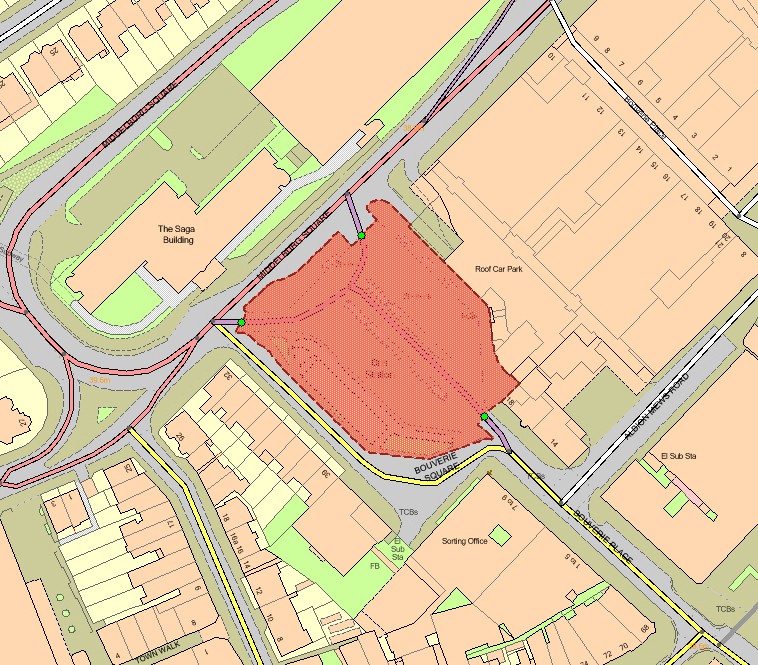
OS MasterMap Sites Layer (red polygon) Road transport theme – bus station
| Functional site | Description |
| ------------------ | ------------------------------------------------------------------------------------------------------------------------------------------------------------------------------------------------------------------------ |
| Coach station | A place where coaches begin, break or end a journey and at which passengers may embark or disembark. A coach station may consist of buildings or may simply be an area specifically set aside with shelters and signage. |
| Bus station | A place where buses begin, break or end their journey and at which passengers may embark or disembark. A bus station may consist of buildings or may simply be an area specifically set aside with shelters and signage. |
| Road user services | An area for the supply of fuel, refreshments and so on near a road or motorway. |
All road transport sites will be captured as indicated below unless they fall out of scope (for example, a private property).
The following features are included in the captured extent:
* Bus/coach station buildings (for example, ticket office, waiting room)
* Bus/coach station shelters
* Car/bus/coach parking areas
* Buildings for bus/coach storage, maintenance and cleaning
* Access roads and paths
* Areas of man-made and natural surface surrounded by included areas The following features are **not** included in the captured extent:
* Public roads and pavements
* Pedestrian through-routes
---
# Agent Instructions
This documentation is published with GitBook. GitBook is the documentation platform designed so that both humans and AI agents can read, navigate, and reason over technical content effectively. Learn more at gitbook.com.
## Querying This Documentation
If you need additional information that is not directly available in this page, you can query the documentation by asking a question.
Perform an HTTP GET request on the following URL with the `ask` and `goal` query parameters:
```
GET https://docs.os.uk/os-downloads/products/land-and-terrain-portfolio/os-mastermap-sites-layer/os-mastermap-sites-layer-technical-specification/theme-definitions/road-transport.md?ask=&goal=
```
`ask` is the immediate question: it should be specific, self-contained, and written in natural language.
`goal` is what the user is ultimately trying to achieve, the reason they need the answer. Sharing it helps GitBook give you a better, more relevant answer. A goal is most helpful when it describes the outcome the user wants rather than restating the question. For example, with `ask=how do I create an API token`, a goal like `automate deployments from our CI pipeline` lets GitBook tailor the answer to that use case.
The response will contain a direct answer to the question and relevant excerpts and sources from the documentation.
Use this mechanism when the answer is not explicitly present in the current page, you need clarification or additional context, or you want to retrieve related documentation sections.