> For the complete documentation index, see [llms.txt](https://docs.os.uk/os-downloads/llms.txt). Markdown versions of documentation pages are available by appending `.md` to page URLs; this page is available as [Markdown](https://docs.os.uk/os-downloads/products/land-and-terrain-portfolio/os-open-greenspace/os-open-greenspace-overview/product-details.md).
# Product details
## Feature types
OS Open Greenspace has two feature types:
* **Greenspace Site** – A polygon defining the extent of greenspaces, such as parks and sports facilities, that are likely to be open for use by members of the public. These extents are generalised.
* **Access Point** – A point feature denoting where access to a site is located and the kind of access permitted at that location.
Each feature type has associated attribution described in [Product details](/os-downloads/products/land-and-terrain-portfolio/os-open-greenspace/os-open-greenspace-overview/product-details.md).
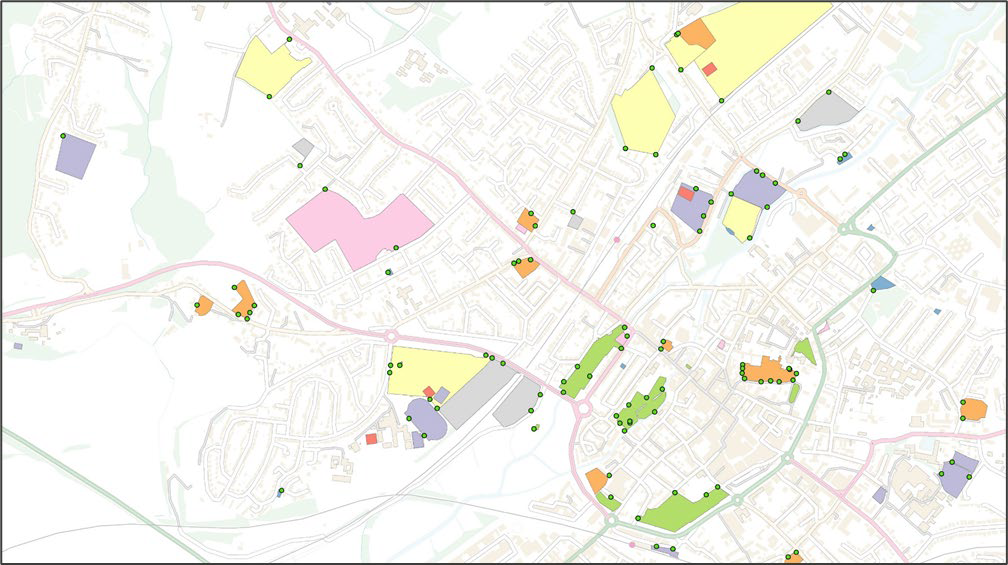
OS Open Greenspace Site polygons and Access Points overlaid on an OS OpenMap – Local basemap.
## Attribution
### Greenspace Sites
Greenspace Site features are in the form of a geolocated polygon layer that carries the following attributes:
* **ID** – The unique identifier of the Greenspace Site. The ID is generated for each release and will change between versions of the product.
* **Distinctive Name** – The name of the Greenspace Site. Up to four distinctive name attributes can be populated if a site is known locally by more than one name. Distinctive name attributes are populated in numerical order and only where relevant.
For many greenspaces, this relies on information from local experts who have been encouraged to share relevant information with Ordnance Survey. These names are expected to be useful in gathering more information about a site, such as its opening times or ownership information.
Distinctive names are populated where they can be sourced from relevant existing data holdings during product creation. As a result, only a limited number of records will contain Distinctive Name attribution; the population of this attribute will improve over time.
* **Function** – The purpose of the Greenspace Site, that is, what the site is used for. Functions are determined from a specific greenspace list and only sites that fall within the list are included. OS Open Greenspace includes the following functions:
* Allotments Or Community Growing Space
* Bowling Green
* Cemetery
* Religious Grounds (Populated where there is a significant amount of accessible greenspace; this is defined as more than 500m2 of natural surface within the site.)
* Golf Course
* Other Sports Facility
* Play Space
* Playing Field (Only playing fields that are used by the public at least some of the time are included in the product. School fields, for example, which are entirely enclosed and used only by the school are not included.)
* Public Park Or Garden
* Tennis Court
{% hint style="info" %}
*Sports stadiums and grounds which are used primarily for spectating rather than participating in sports are not included in OS Open Greenspace.*
{% endhint %}
More detail and descriptions of these Functions can be found in the [*technical specification*](/os-downloads/products/land-and-terrain-portfolio/os-open-greenspace/os-open-greenspace-technical-specification.md).
### Access Points
Access Point features come in the form of a geolocated point layer that carries the following attributes:
* **ID** – The unique identifier of the Access Point.
* **Reference to Greenspace Site** – The unique identifier of the Greenspace Site to which the Access Point relates.
* **Access Type** – The type of access permitted at the Access Point. Access Types are determined from a specific list and only Access Points which fall within the list are included. The following Access Types are permitted:
* Motor Vehicle
* Motor Vehicle and Pedestrian
* Pedestrian
More detail on Access Types can be found in the [*technical specification*](/os-downloads/products/land-and-terrain-portfolio/os-open-greenspace/os-open-greenspace-technical-specification.md).
### Nested sites
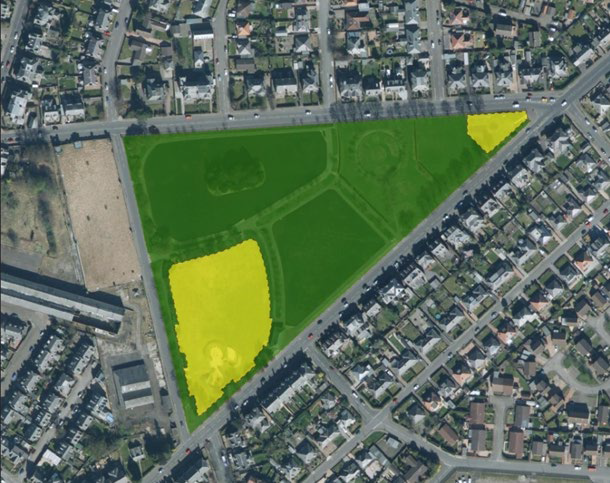
Where more than one Function is identified within a greenspace, nesting is used. This means that where sites overlap, or where a whole site is contained within a larger site, they are published as separate polygons that overlap one another. For example, in the image below, the whole park including the play areas (green polygon) is captured as one site. The play areas (yellow polygons) are captured separately, and these sites overlap with the park.
Satellite image of a Greenspace Site with two nested sites.
Where a nested site has the same Function attribute as the main site, it is merged into the main site, and not shown as separate; this avoids duplicating the greenspace function of sites.
### Generalisation
The detail within OS Open Greenspace is automatically generalised using Ordnance Survey large-scale data. Generalisation is the process of reducing the complexity of the data whilst maintaining the key elements and characteristics of the features. OS Open Greenspace generalisation applies in two ways:
* **Greenspace Site** – All Greenspace Sites are generalised to achieve consistency throughout the product. No sites have been removed during this process.
* **Access Point** – Access Points are not moved by the generalisation process and remain in their actual location, allowing them to be used appropriately with large-scale data when required.
## Coordinate reference system
The Geography Markup Language (GML) and GeoPackage formats use the British National Grid (BNG) spatial reference system. BNG uses the OSGB36 geodetic datum and a single Transverse Mercator projection for the whole of Great Britain. Positions on this projection are described using easting and northing coordinates in units of metres.
Vector tile format is supplied in Web Mercator projection (EPSG:3857). Web Mercator projection uses WGS84 geodetic datum to render the vector tiles.
[A Guide to Coordinate Systems in Great Britain](https://docs.os.uk/more-than-maps/deep-dive/a-guide-to-coordinate-systems-in-great-britain) provides a comprehensive tutorial on the topic.
A general introductory guide to BNG is provided at:
* [Beginner's guide to grid references](https://getoutside.ordnancesurvey.co.uk/guides/beginners-guide-to-grid-references/)
---
# Agent Instructions
This documentation is published with GitBook. GitBook is the documentation platform designed so that both humans and AI agents can read, navigate, and reason over technical content effectively. Learn more at gitbook.com.
## Querying This Documentation
If you need additional information that is not directly available in this page, you can query the documentation by asking a question.
Perform an HTTP GET request on the following URL with the `ask` and `goal` query parameters:
```
GET https://docs.os.uk/os-downloads/products/land-and-terrain-portfolio/os-open-greenspace/os-open-greenspace-overview/product-details.md?ask=&goal=
```
`ask` is the immediate question: it should be specific, self-contained, and written in natural language.
`goal` is what the user is ultimately trying to achieve, the reason they need the answer. Sharing it helps GitBook give you a better, more relevant answer. A goal is most helpful when it describes the outcome the user wants rather than restating the question. For example, with `ask=how do I create an API token`, a goal like `automate deployments from our CI pipeline` lets GitBook tailor the answer to that use case.
The response will contain a direct answer to the question and relevant excerpts and sources from the documentation.
Use this mechanism when the answer is not explicitly present in the current page, you need clarification or additional context, or you want to retrieve related documentation sections.