# OS MasterMap Imagery Layer Documentation

Digital colour-balanced and corrected for geometric distortions (orthorectified) aerial photography of OS MasterMap Imagery Layer gives you a real-world view of the terrain and its features.

{% hint style="info" %}
**This product is updated quarterly in February, May, August and November.**
{% endhint %}

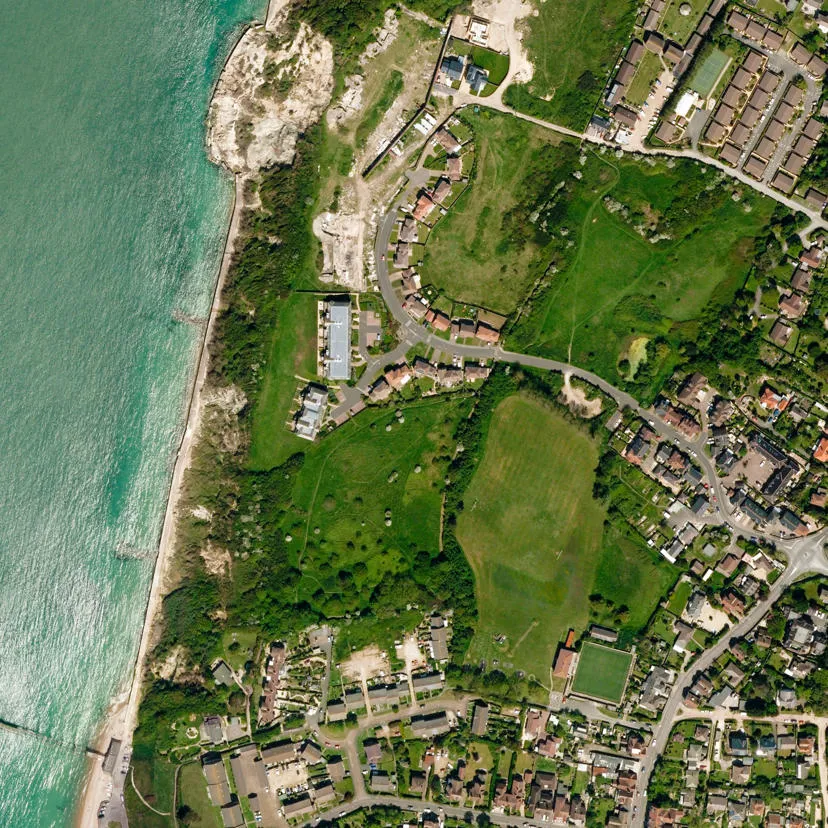
<figure><img src="https://1897589978-files.gitbook.io/~/files/v0/b/gitbook-x-prod.appspot.com/o/spaces%2FcNpJpLP8RROUaWVQo5ea%2Fuploads%2F0tYA6U5WwF3ReGyMscoy%2Fosmm-imagery-place5.x5335a7c4.x851556cb.webp?alt=media&#x26;token=489430d5-96a3-4eb0-8fcb-95756f705b44" alt="A representation of OS MasterMap Imagery Layer data showing a small area of coastline from above" width="563"><figcaption><p>A representation of OS MasterMap Imagery Layer data showing a small area of coastline from above.</p></figcaption></figure>

{% tabs %}
{% tab title="Benefits" %}
**Reduce the need for site visits**

Using aerial imagery to check road markings, tree canopies or site entrances cuts down the need for site visits, so you can save money and manage time more efficiently.

**Revelation for engineers, surveyors and planners**

For engineers, surveyors, and planners OS MasterMap Imagery Layer is a revelation. It's aligned to [OS MasterMap Topography Layer](https://docs.os.uk/os-downloads/products/maps-and-imagery-portfolio/broken-reference) and is incredibly detailed, expertly colour-balanced and corrected for geometric distortions.

**Ideal for projects**

OS MasterMap Imagery Layer is an off-the-shelf product for the whole of Great Britain. You can get it under perpetual use terms – ideal for projects – as well as fixed-term licences.

**Up-to-date imagery and data**

OS MasterMap Imagery Layer uses the same source imagery that underpins our large-scale data updates. Our processing software produces true-orthorectified imagery, removing building lean from aerial imagery to give you a consistent top-down view.

**Easily interpret the detail**

You can easily spot properties with solar panels, conservatories and other home improvements, thanks to the layer's 25cm resolution. This makes the product ideal for planning and environmental monitoring.
{% endtab %}

{% tab title="Use Cases" %}
OS MasterMap Imagery Layer can be used in applications often reducing the need for costly site visits:

* Property insurance
* Risk analysis
* Asset management
* Site evaluation
* Land-use cover analysis
* Agricultural land use and crops inventory
* Property management and planning applications
* Route planning and accessibility assessments
* Location-based services
* Vegetation studies and environmental analysis
  {% endtab %}

{% tab title="Summary" %}

* **Access:** Download via the [OS Data Hub](https://osdatahub.os.uk/) and hard disk drive (HDD)
* **Data theme:** Contextual
* **Data structure:** Raster
* **Coverage:** Great Britain
* **Scale:** 1:1 250 to 1:10 000
* **Format:** JPEG, TIFF, ECW
* **Ordering area:** All of Great Britain or customisable area (1km² tiles)
* **Publication months:** February, May, August, November
  {% endtab %}

{% tab title="Additional Information" %}
**Ensuring the quality of OS imagery**

Ordnance Survey has invested considerable resources and worked closely with its imagery suppliers to provide orthorectified imagery that achieves the consistently high quality expected by our customers.

Unlike other data sources, such as topographic data, imagery can be very subjective. It is difficult to quantify specific tolerances for atmospheric conditions, such as haze. We ensure our suppliers adhere to a detailed set of quality levels for the key aspects of imagery with an emphasis on data quality over image appearance alone. For instance, priority is given to ensuring details such as road markings can be seen within shadows and to positional accuracy.

These acceptable quality levels are summarised in the user guide and include:

* The photography and how it is captured
* The controls and height models used for orthorectification
* Geometric fidelity (shape), absolute accuracy (position), radiometric accuracy (colour) and image appearance (contrast, haze, cloud cover and distortions)

**Active capture programme**

More than 99.99% of our imagery is less than 5 years old; 76.36% is less than 3 years old.

**OS MasterMap Layers are designed to be used together**

As the OS MasterMap Imagery Layer is a raster product, unlike the other (vector) layers in the OS MasterMap product range, TOIDs are not part of the data specification. However, OS MasterMap layers are designed to be used together in order to create a synchronised tool for analysis of many different types of data in a GIS. Thus other layers can be drawn over imagery to provide information, such as TOIDs.

**All imagery since 2015 is 'True' Orthorectified (without building lean)**

However, within these images there may be small patches of 'traditional' ortho (with building lean) which have been introduced to resolve geometric or image appearance / artefact issues. Whether 'True' or 'traditional' Ortho, buildings should always be geometrically correct, located in their correct geographical position and suitable for analytical interpretation.

**Great care is taken to ensure that the images in the Layer meet our detailed Image Appearance criteria**

However, on occasion and under certain circumstances, these rules are relaxed. For example, if opportunities to capture new imagery have been limited by poor weather and existing imagery in the Imagery Layer is deemed out-of-date, then imagery will be accepted provided detail is visible on the ground. In these circumstances, image currency takes precedence over image appearance.
{% endtab %}
{% endtabs %}

## How to get this product

The [OS MasterMap Imagery Layer product page on the OS website](https://www.ordnancesurvey.co.uk/products/os-mastermap-imagery-layer) has advice on how to get the product for developers, businesses and OS Partners.

Alternatively, you can try out the full product for free for six months by applying for [a Data Exploration licence](https://www.ordnancesurvey.co.uk/licensing/data-exploration-licence); this licence is primarily designed for organisations either considering becoming an OS Partner or who want to trial OS Premium data before working with an existing OS Partner.

{% hint style="info" %}
This product is not available as part of the Public Sector Geospatial Agreement (PSGA). You can read more about the PSGA and discover which products are included on the [PSGA Product summary page](https://docs.os.uk/os-downloads/resources/product-resources/psga-product-summary) in the resources section.
{% endhint %}

## Sample data

### Visualise OS MasterMap Imagery layer sample data online

This product is available to try out free online using one of our three sets of sample data (Exeter, Newport and Inverness) through the OS MasterMap Product Viewer:

<table data-view="cards" data-full-width="false"><thead><tr><th></th><th></th><th data-hidden></th><th data-hidden data-card-cover data-type="image">Cover image</th><th data-hidden data-card-target data-type="content-ref"></th></tr></thead><tbody><tr><td><strong>OS MasterMap Product Viewer</strong></td><td>Interactive demonstrator of OS MasterMap Generation data</td><td></td><td data-object-fit="cover" data-alt="Example image showing OS VectorMap Local product data over an urban area."><a href="https://1897589978-files.gitbook.io/~/files/v0/b/gitbook-x-prod.appspot.com/o/spaces%2FcNpJpLP8RROUaWVQo5ea%2Fuploads%2Fuld7V42IKrB8ovpC1JXB%2FVectorMap-Local-1.png?alt=media&#x26;token=cb3e8ae9-d669-4bc9-b7a7-5f479d780447">VectorMap-Local-1.png</a></td><td><a href="https://experience.arcgis.com/experience/20981dabcb14402687dccb437a4a78fb/">https://experience.arcgis.com/experience/20981dabcb14402687dccb437a4a78fb/</a></td></tr></tbody></table>

## What's next?

To access additional documentation and resources relating to this product, please refer to the following:

<table data-view="cards"><thead><tr><th></th><th></th><th></th><th data-hidden data-card-cover data-type="image">Cover image</th><th data-hidden data-card-target data-type="content-ref"></th></tr></thead><tbody><tr><td><h4>Technical Specification</h4></td><td>The technical specification provides detailed technical information about OS MasterMap Imagery Layer. It is targeted at technical users and software developers.</td><td></td><td data-object-fit="cover" data-alt="Example image showing OS MasterMap Imagery Layer product data. The image shows farmland."><a href="https://1897589978-files.gitbook.io/~/files/v0/b/gitbook-x-prod.appspot.com/o/spaces%2FcNpJpLP8RROUaWVQo5ea%2Fuploads%2FyxE3lwA85WTrDFHT1mgY%2FMasterMap-Imagery-2.png?alt=media&#x26;token=15c383eb-4833-4a21-96ce-28ec8a27943a">MasterMap-Imagery-2.png</a></td><td><a href="os-mastermap-imagery-layer/os-mastermap-imagery-layer-technical-specification">os-mastermap-imagery-layer-technical-specification</a></td></tr><tr><td><h4>Downloads</h4></td><td>The downloads page provides links and resources to support the application of OS MasterMap Imagery Layer within your environment.</td><td></td><td data-object-fit="cover" data-alt="Example image showing OS MasterMap Imagery Layer product data. The image shows a section of coastline."><a href="https://1897589978-files.gitbook.io/~/files/v0/b/gitbook-x-prod.appspot.com/o/spaces%2FcNpJpLP8RROUaWVQo5ea%2Fuploads%2FMrmvp6AAUZ3sE7PJsfrv%2FMasterMap-Imagery-4Web.png?alt=media&#x26;token=f4025b4f-efe7-4b1f-81b4-2921770c3ad3">MasterMap-Imagery-4Web.png</a></td><td><a href="os-mastermap-imagery-layer/os-mastermap-imagery-layer-downloads">os-mastermap-imagery-layer-downloads</a></td></tr><tr><td><h4>Ordnance Survey Website</h4></td><td>View OS MasterMap Imagery Layer product information and find out how to get this product on the OS website.</td><td></td><td></td><td><a href="https://www.ordnancesurvey.co.uk/products/os-mastermap-imagery-layer">https://www.ordnancesurvey.co.uk/products/os-mastermap-imagery-layer</a></td></tr></tbody></table>
