> For the complete documentation index, see [llms.txt](https://docs.os.uk/os-downloads/llms.txt). Markdown versions of documentation pages are available by appending `.md` to page URLs; this page is available as [Markdown](https://docs.os.uk/os-downloads/products/maps-and-imagery-portfolio/os-vectormap-district/os-vectormap-district-overview.md).
# OS VectorMap District Overview
This document contains additional theoretical information related to OS VectorMap District. All users will find the Product Information document useful and informative.
OS VectorMap District is a free mapping dataset designed for providing contextual mapping output on paper, PCs, hand-held devices, or the Internet. Available as pre-styled static images (Raster data) and points, lines, and polygons (Vector data). The vector format of the product consists of layers to enable you to customise and style output to suit your needs.
OS VectorMap District has been improved to offer enhanced functionality as well as offering greater consistency with other OS products, including [OS Open Map – Local](/os-downloads/products/maps-and-imagery-portfolio/os-openmap-local.md).
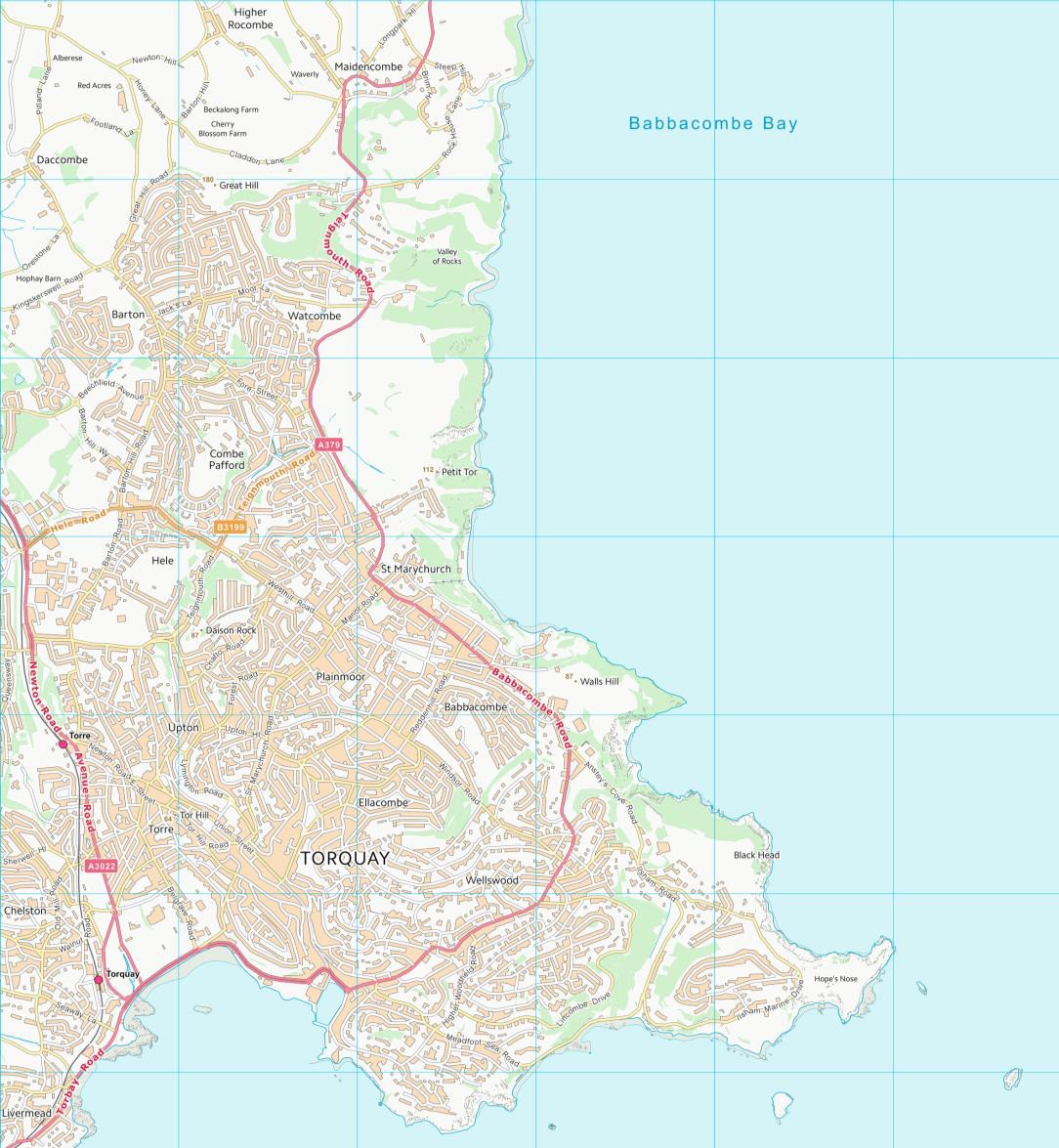
The product now offers significantly improved generalisation, resulting in a more attractive map that compliments the more detailed street-level [OS VectorMap® Local product](/os-downloads/products/maps-and-imagery-portfolio/os-vectormap-local.md).
1:25 000 VMD Raster of Torquay.
## **Key features**
The key features of OS VectorMap District product are:
* Provides a clear visual backdrop map that can be easily styled to meet specific needs.
* Please refer to the Product Cartographic Stylesheets on the Ordnance Survey GitBook for styling options:
* Offers flexibility to user through ease of use to control content display.
* Suitable for varying scenarios around the mid-range scale of 1:25 000
* Analyse data in relation to important public buildings, roads, railways, lines and more
* Compatible with other open datasets available from [data.gov.uk](http://data.gov.uk/) and many other sources.
## **Product applications**
The purpose of OS VectorMap District data is to support a wide range of customer applications that utilise geographic information. These may include:
### **Backdrop mapping on your website**
For your area, you may wish to take advantage of free data on the Government’s [data.gov.uk](http://data.gov.uk/) website, for example, air pollution data. The layered structure of OS VectorMap District enables you to display the map to show only the features you want to show – for example, roads, place names and buildings.
You may want to style the data as a faded map backdrop to ensure your own or third-party overlaid data are clearly portrayed. For example, backdrop mapping can be used by public sector organisations to share information with the public. Such applications include providing the location of GP surgeries or dentists to the public, or the performance of schools based on exam results in a district.
### **Develop an interactive web application**
OS VectorMap District has been designed for on-screen use, with generalised detail and an appropriate level of content that gives an uncluttered appearance. Subscribers to the OS OpenSpace® application programming interface (API) can build location-based services using the map to guide smartphone users and provide location-specific information.
### **Display your business location**
Do you want to tell your customers how to get to your business? The district view of OS VectorMap District is ideal for creating a map of a suburban area or part of a city, complete with locality names for context.
Your customers can then zoom in to your business at a street level using the OS VectorMap District product.
OS VectorMap District topographic features are generalised representations of real-world objects, including buildings, roads, railways, and rivers. The data also includes non-topographic features such as administrative and electoral boundaries (GML and Shapefile format only), cartographic text and symbols.
## Index
* [Generalisation](/os-downloads/products/maps-and-imagery-portfolio/os-vectormap-district/os-vectormap-district-overview/generalisation.md)
* [Feature types](/os-downloads/products/maps-and-imagery-portfolio/os-vectormap-district/os-vectormap-district-overview/feature-types.md)
* [Style definition](/os-downloads/products/maps-and-imagery-portfolio/os-vectormap-district/os-vectormap-district-overview/style-definition.md)
* [Product supply](/os-downloads/products/maps-and-imagery-portfolio/os-vectormap-district/os-vectormap-district-overview/product-supply.md)
---
# Agent Instructions
This documentation is published with GitBook. GitBook is the documentation platform designed so that both humans and AI agents can read, navigate, and reason over technical content effectively. Learn more at gitbook.com.
## Querying This Documentation
If you need additional information that is not directly available in this page, you can query the documentation by asking a question.
Perform an HTTP GET request on the following URL with the `ask` and `goal` query parameters:
```
GET https://docs.os.uk/os-downloads/products/maps-and-imagery-portfolio/os-vectormap-district/os-vectormap-district-overview.md?ask=&goal=
```
`ask` is the immediate question: it should be specific, self-contained, and written in natural language.
`goal` is what the user is ultimately trying to achieve, the reason they need the answer. Sharing it helps GitBook give you a better, more relevant answer. A goal is most helpful when it describes the outcome the user wants rather than restating the question. For example, with `ask=how do I create an API token`, a goal like `automate deployments from our CI pipeline` lets GitBook tailor the answer to that use case.
The response will contain a direct answer to the question and relevant excerpts and sources from the documentation.
Use this mechanism when the answer is not explicitly present in the current page, you need clarification or additional context, or you want to retrieve related documentation sections.