# GraphHopper

[GraphHopper](https://www.graphhopper.com/) is an open source routing engine for OpenStreetMap (OSM).

## What you need

* [Java Virtual Machine (JVM)](https://adoptium.net/en-GB/) (Java 17+)
* [Node.js](https://nodejs.org/en) and [Node Package Manager (npm)](https://www.npmjs.com/package/npm)

To find out if you have **Java** installed:

1. Open PowerShell / Command Prompt (Windows) or Shell (Linux) and type:

```
java -version
```

2. Press *Enter*.\
   \&#xNAN;*If Java is installed, you should see a few lines of text detailing which version you have installed. If you get something along the lines of `"java is not recognized ..."` please download JVM \[or OpenJDK] using the link above in 'What you need'.*

To see if you already have **Node.js** and **npm** installed and check the installed version:

1. Run the following commands:

```
node -v
npm -v
```

*If they are not installed, please follow the* [*'Downloading and installing Node.js and npm' instructions on the npm Docs site*](https://docs.npmjs.com/downloading-and-installing-node-js-and-npm)*.*

## **GraphHopper Routing Engine**

The [GraphHopper repository on GitHub](https://github.com/graphhopper/graphhopper) explains how to download and run the GraphHopper Routing Engine as a Java library or standalone web server to calculate the distance, time, turn-by-turn instructions and many road attributes for a route between two or more points.

To create routes using OS MRN, you require the following files (ensure that they are stored in the same directory):

* The [`graphhopper-web-8.0.jar`](https://repo1.maven.org/maven2/com/graphhopper/graphhopper-web/8.0/graphhopper-web-8.0.jar) JAR (Java ARchive) package file containing the GraphHopper Maps UI and the web service
* A YAML configuration file (`config-example.yml`)
* OS MRN Protocolbuffer Binary Format (PBF) data downloaded from the [OS Data Hub](https://osdatahub.os.uk/) (`OSMulti-modalRoutingNetwork.pbf`)

The [`config-example.yml`](https://raw.githubusercontent.com/graphhopper/graphhopper/8.x/config-example.yml) provided in the aforementioned GraphHopper repository enables basic vehicular (car) routing.

We have created a custom version of this file which allows for vehicular (car) routing with turn costs, as well as the calculation of pedestrian (walking) and cycling routes:

{% file src="/files/ucmpi4SBOjyBmhGOtLGD" %}

Compared to the basic configuration file, you'll see that the custom version enables turn restrictions (under the car profile) and includes additional profiles to enable cycling and walking:

```yaml
profiles:
  - name: car
    vehicle: car
    custom_model:
      distance_influence: 70
    turn_costs: true
    u_turn_costs: 60

  - name: bike
    vehicle: bike
    custom_model_files: [bike.json]

  - name: foot
    vehicle: foot
    custom_model_files: []
```

{% hint style="info" %}

* The `turn_costs` line tells GraphHopper to force the `car` travel mode ("profile") to respect turn restrictions.
* The `u_turn_costs` line tells GraphHopper how long a U-turn should add to your route (in this case, 60 seconds).
* The `custom_model_files` are required but can be empty. The optional `bike.json` is a reference to a specification to get cycle routing to prefer less busy roads, for example.
  {% endhint %}

By default (i.e. only using driving routing), GraphHopper knows there's no need to read in footpaths, cycleways, etc. Now that you want the additional "profiles", you need to change that.

This means that there is one final configuration change you need to do which will force GraphHopper to read every type of link:

1. Use *Ctrl+F* to search the `config-example-multiple.yml`file for:

```yaml
import.osm.ignored_highways: []
```

2. You can now start the GraphHopper Maps UI and the web service as follows:

{% code overflow="wrap" %}

```
java -D"dw.graphhopper.datareader.file=OSMulti-modalRoutingNetwork.pbf" -jar graphhopper-web-8.0.jar server config-example-multiple.yml
```

{% endcode %}

*This reads in the OS MRN data and sets everything up. It might take a few minutes the first time you run this command, but when complete, you will see two folders have been added to your directory: "graph-cache" and "logs".*

*When you start GraphHopper again, it will see the data contained within the "graph-cache" folder and know that it doesn't have to re-read the PBF file. However, if you update your .pbf or .yml files, make sure you delete "graph-cache" before starting GraphHopper again.*

3. Once you see a `'Server - Started'` log message, go to <http://localhost:8989/> and you'll see an interactive map of your chosen location.
4. Right-click on the map to create a route.

## **GraphHopper Maps**

The [GraphHopper Maps repository on GitHub](https://github.com/graphhopper/graphhopper-maps) supplements the GraphHopper Routing Engine as a customisable version of the route planner user interface. This repository contains instructions on how to start development and how to make configuration changes, including adding different map tile providers. You can add [OS Maps API](https://docs.os.uk/os-apis/accessing-os-apis/os-maps-api), [OS Vector Tile API](https://docs.os.uk/os-apis/accessing-os-apis/os-vector-tile-api) or [OS NGD API – Tiles](https://docs.os.uk/osngd/accessing-os-ngd/access-the-os-ngd-api/os-ngd-api-tiles) if you like.

You will also be able to point to the web service hosted at <http://localhost:3000/>.

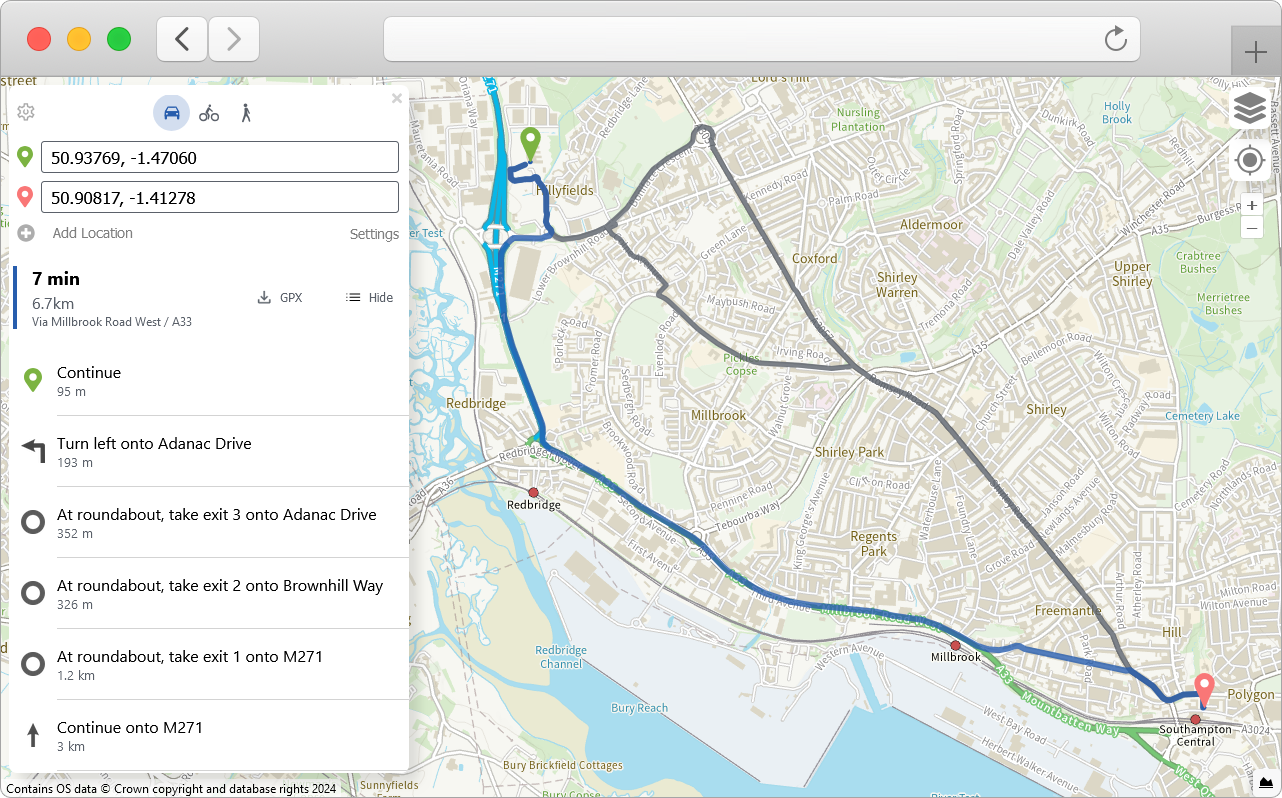
To ease getting up-and-running, we have taken a fork of the above repository and made the necessary [changes](https://github.com/OrdnanceSurvey/graphhopper-maps/commit/f2a794babb05c00b80bee84b72c102eabd7b1075) to add in the OS Maps API Outdoor, Light and Road styles. You can clone the forked repository from the [OS GraphHopper Maps repository on GitHub](https://github.com/OrdnanceSurvey/graphhopper-maps).

All you need to then do is add a valid API Key (with a suitable [API Plan](https://osdatahub.os.uk/plans)) to the[`config.js`](https://github.com/OrdnanceSurvey/graphhopper-maps/blob/master/config.js#L22) file.<br>

<figure><img src="/files/nU5Uohe6gMQtCBlett8z" alt="GraphHopper Maps UI showing an example route in Southampton in the map area which was created using OS MRN in GraphHopper and configured with an OS Maps API Outdoor style basemap."><figcaption><p>GraphHopper Maps UI showing an example route in the map area which was created using OS MRN in GraphHopper and configured with an OS Maps API Outdoor style basemap.</p></figcaption></figure>


---

# Agent Instructions: Querying This Documentation

If you need additional information that is not directly available in this page, you can query the documentation dynamically by asking a question.

Perform an HTTP GET request on the current page URL with the `ask` query parameter:

```
GET https://docs.os.uk/os-downloads/products/transport-network-portfolio/os-multi-modal-routing-network/os-mrn-getting-started-guide/graphhopper.md?ask=<question>
```

The question should be specific, self-contained, and written in natural language.
The response will contain a direct answer to the question and relevant excerpts and sources from the documentation.

Use this mechanism when the answer is not explicitly present in the current page, you need clarification or additional context, or you want to retrieve related documentation sections.
