> For the complete documentation index, see [llms.txt](https://docs.os.uk/os-downloads/llms.txt). Markdown versions of documentation pages are available by appending `.md` to page URLs; this page is available as [Markdown](https://docs.os.uk/os-downloads/products/transport-network-portfolio/os-open-roads/os-open-roads-overview.md).
# OS Open Roads Overview
This overview introduces OS Open Roads and gives context for all users – highlighting key features, providing examples of uses, and listing details such as file sizes, supply formats, etc.
OS Open Roads is a digital representation of Great Britain’s roads. The links represent an approximate central alignment of the road carriageway and include roads classified by the national or local highway authority (for example, A roads) and unclassified roads, which together make up Great Britain’s road network.
Attributes identify the roads that make up the strategic route network (SRN) and the primary route network (PRN). The SRN is made up of nationally significant roads used for the distribution of goods and services, and as a network for the travelling public. They are known as trunk roads. The PRN is made up of roads used for transport on a regional or county level and includes all roads which make up the SRN.
OS Open Roads is a generalised product which is automatically simplified from Ordnance Survey large-scale data. Generalisation is the process of reducing the scale and complexity of the data whilst maintaining the important elements and characteristics of the features. The appropriate product scale is 1:25 000, with a recommended viewing scale range of 1:15 000 to 1:30 000.
## Key features
The key features of the OS Open Roads product are as follows:
* Comprehensive coverage of the road network for Great Britain.
* A topologically-structured link-and-node network.
* The identification of roads that form part of the SRN.
* The ability to reference between the OS Open Roads and OS MasterMap Highways Network products.
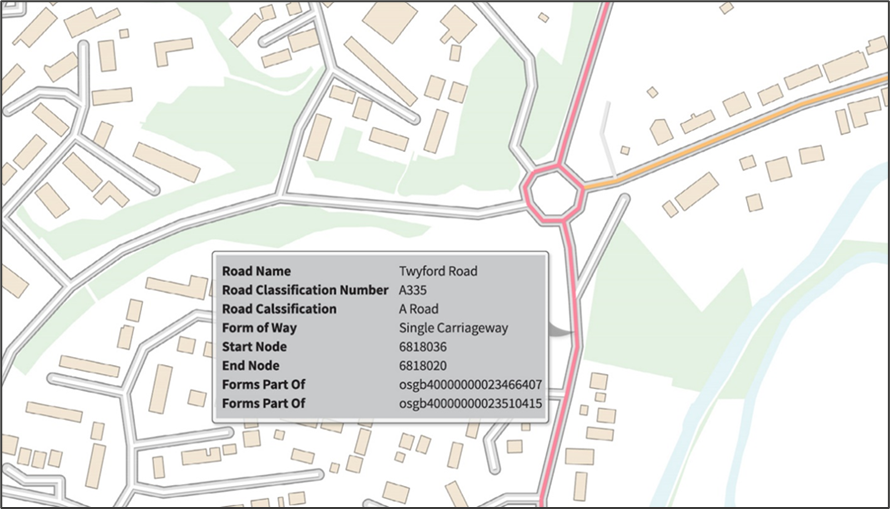
Example map of an A road, highlighting a single carriageway.
## Applications
OS Open Roads supports a wide range of customer applications that use geographic information. The product can be used alone or in combination with other Ordnance Survey products, such as [Terrain 50](/os-downloads/products/land-and-terrain-portfolio/os-terrain-50.md) or [VectorMap District](/os-downloads/products/maps-and-imagery-portfolio/os-vectormap-district.md). OS Open Roads has numerous applications, including but not limited to, the following examples:
* Assigning information to the road network for both personal and business use.
* High-level analytical queries, for example, how many kilometres (kms) of road are there in Great Britain, an individual country, or a region.
* Simple drive-time analysis, for example, what is within a 25-minute drive of any given location?
* Identifying community problems and reporting back to a relevant authority.
Detailed turn-by-turn routing is not supported in OS Open Roads; this requires the additional detail and complexity available in[ OS MasterMap Highways Network](/os-downloads/products/transport-network-portfolio/os-mastermap-highways-network-fundamentals.md).
Definitive details of the responsibility for road maintenance are not supported in OS Open Roads; this requires the additional detail held in the OS MasterMap Highways Network.
## Guides
Guidance on how to use this product in GeoPackage and vector tiles formats can be found in the following documents:
* [*Getting Started with GeoPackage*](/os-downloads/resources/product-resources/getting-started-with-geopackage-and-vector-tiles-guides/getting-started-with-geopackage.md)
* [*Getting Started with Vector Tiles*](/os-downloads/resources/product-resources/getting-started-with-geopackage-and-vector-tiles-guides/getting-started-with-vector-tiles.md)
---
# Agent Instructions
This documentation is published with GitBook. GitBook is the documentation platform designed so that both humans and AI agents can read, navigate, and reason over technical content effectively. Learn more at gitbook.com.
## Querying This Documentation
If you need additional information that is not directly available in this page, you can query the documentation by asking a question.
Perform an HTTP GET request on the following URL with the `ask` and `goal` query parameters:
```
GET https://docs.os.uk/os-downloads/products/transport-network-portfolio/os-open-roads/os-open-roads-overview.md?ask=&goal=
```
`ask` is the immediate question: it should be specific, self-contained, and written in natural language.
`goal` is what the user is ultimately trying to achieve, the reason they need the answer. Sharing it helps GitBook give you a better, more relevant answer. A goal is most helpful when it describes the outcome the user wants rather than restating the question. For example, with `ask=how do I create an API token`, a goal like `automate deployments from our CI pipeline` lets GitBook tailor the answer to that use case.
The response will contain a direct answer to the question and relevant excerpts and sources from the documentation.
Use this mechanism when the answer is not explicitly present in the current page, you need clarification or additional context, or you want to retrieve related documentation sections.