> For the complete documentation index, see [llms.txt](https://docs.os.uk/os-downloads/llms.txt). Markdown versions of documentation pages are available by appending `.md` to page URLs; this page is available as [Markdown](https://docs.os.uk/os-downloads/products/water-portfolio/os-open-rivers/os-open-rivers-overview.md).
# OS Open Rivers Overview
This overview introduces OS Open Rivers and gives context for all users – highlighting key features, providing examples of uses, and listing details such as file sizes, supply formats, etc.
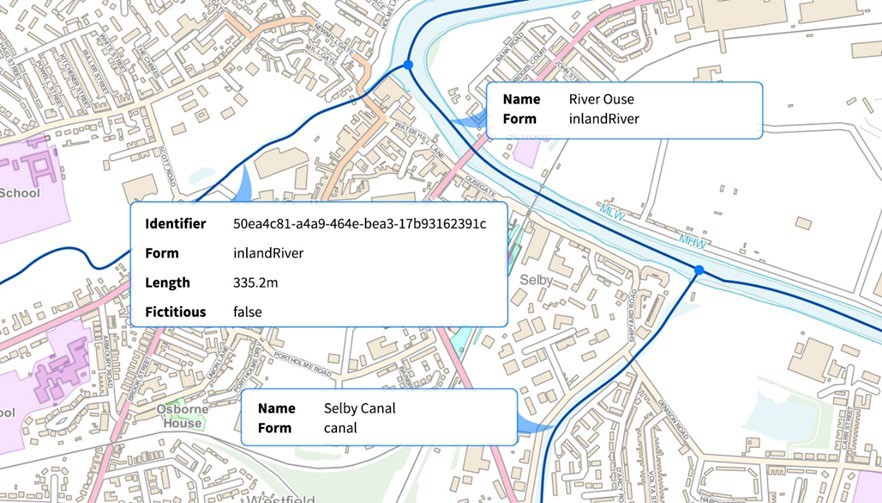
OS Open Rivers provides a two-dimensional, topologically-structured link-and-node network of Great Britain’s watercourses. A link represents the approximate central alignment of a watercourse. Attribution indicates the flow direction and name of each watercourse.
OS Open Rivers is a generalised product which is automatically derived from Ordnance Survey large-scale data. The nominal usage scale is 1:25 000, with a recommended viewing scale range of 1:15 000 to 1:30 000.
## Key features
The key features of the OS Open Rivers product are as follows:
* Comprehensive coverage of Great Britain's river network.
* A topologically-structured link-and-node network.
* Water flow direction information.
* Classified links which allow you to identify the differences between tidal and inland rivers.
Illustrative image of OS Open Rivers and its associated attribution.
## Applications
OS Open Rivers supports a wide range of applications that use geographic information. The product can be used alone or in combination with other Ordnance Survey products, such as [Terrain 50](/os-downloads/products/land-and-terrain-portfolio/os-terrain-50.md) or [VectorMap District](/os-downloads/products/maps-and-imagery-portfolio/os-vectormap-district.md). OS Open Rivers has numerous applications, including but not limited to, the following examples:
* Relating information to the river network for both personal and business use
* Simple analytical queries (for example, the overall lengths of larger rivers in Great Britain)
* Simple planning around main watercourses using the detailed connectivity and flow (from source to mouth) information
* Regional-level environmental impact assessments (for example, an indication of what towns have rivers passing through them)
* Backdrop mapping
It is important to note that detailed analysis is not supported in OS Open Rivers; this requires the additional detail and complexity available in data from the [OS National Geographic Database (OS NGD) Water Theme](https://docs.os.uk/osngd/data-structure/water).
---
# Agent Instructions
This documentation is published with GitBook. GitBook is the documentation platform designed so that both humans and AI agents can read, navigate, and reason over technical content effectively. Learn more at gitbook.com.
## Querying This Documentation
If you need additional information that is not directly available in this page, you can query the documentation by asking a question.
Perform an HTTP GET request on the following URL with the `ask` and `goal` query parameters:
```
GET https://docs.os.uk/os-downloads/products/water-portfolio/os-open-rivers/os-open-rivers-overview.md?ask=&goal=
```
`ask` is the immediate question: it should be specific, self-contained, and written in natural language.
`goal` is what the user is ultimately trying to achieve, the reason they need the answer. Sharing it helps GitBook give you a better, more relevant answer. A goal is most helpful when it describes the outcome the user wants rather than restating the question. For example, with `ask=how do I create an API token`, a goal like `automate deployments from our CI pipeline` lets GitBook tailor the answer to that use case.
The response will contain a direct answer to the question and relevant excerpts and sources from the documentation.
Use this mechanism when the answer is not explicitly present in the current page, you need clarification or additional context, or you want to retrieve related documentation sections.