> For the complete documentation index, see [llms.txt](https://docs.os.uk/os-downloads/llms.txt). Markdown versions of documentation pages are available by appending `.md` to page URLs; this page is available as [Markdown](https://docs.os.uk/os-downloads/upcoming-products/beta-products-information/os-3d-mesh-beta-product/getting-started-guide/importing-an-os-integrated-mesh-model-into-arcgis-pro/scene-lighting.md).

# Scene lighting

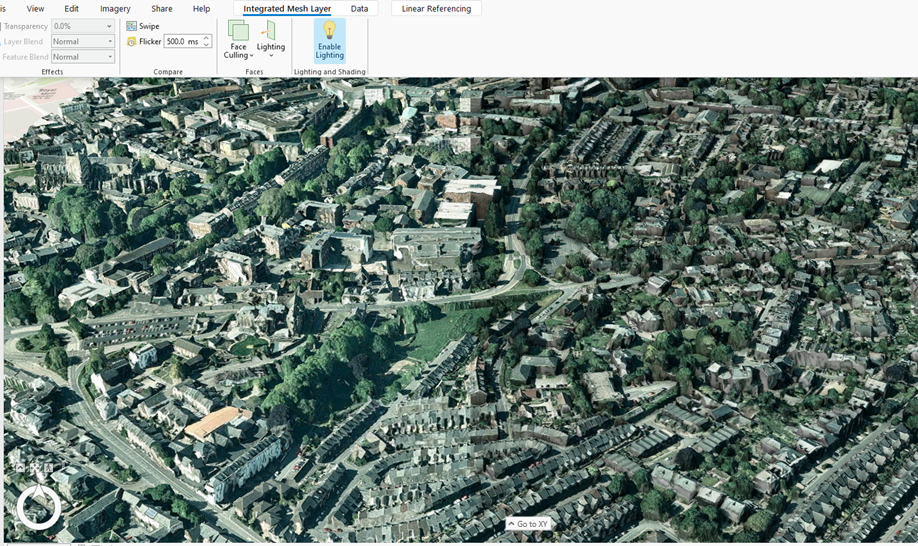
A basic way to improve the overall look of your integrated mesh is to apply scene lighting. This can be enabled using the 'Enable Lighting' button on the ‘Integrated Mesh Layer’ menu. Further lighting variations can be chosen from the Lighting dropdown menu (a full description of these can be found at [3D effects—ArcGIS Pro | Documentation](https://pro.arcgis.com/en/pro-app/latest/help/mapping/layer-properties/3d-effects.htm)).<br>

<figure><img src="/files/EVDTCvtdaga2OBrV4iZz" alt="A Scene lighting example image. Scene lighting is turned off in the left image, resulting in a harsh and simplistic default view. It can be seen that the lit scene, to the right, looks rather more natural in comparison."><figcaption><p>A Scene lighting example image. Scene lighting is turned off in the left image, resulting in a harsh and simplistic default view. It can be seen that the lit scene, to the right, looks rather more natural in comparison.</p></figcaption></figure>

{% hint style="info" %}
In ArcGIS Pro version 3.3, specifically, we’ve experienced issues with the lighting options than weren’t present when using previous versions. We assume that this will be addressed in a future update.
{% endhint %}


---

# Agent Instructions
This documentation is published with GitBook. GitBook is the documentation platform designed so that both humans and AI agents can read, navigate, and reason over technical content effectively. Learn more at gitbook.com.

## Querying This Documentation
If you need additional information that is not directly available in this page, you can query the documentation dynamically by asking a question.

Perform an HTTP GET request on the current page URL with the `ask` query parameter:

```
GET https://docs.os.uk/os-downloads/upcoming-products/beta-products-information/os-3d-mesh-beta-product/getting-started-guide/importing-an-os-integrated-mesh-model-into-arcgis-pro/scene-lighting.md?ask=<question>
```

The question should be specific, self-contained, and written in natural language.
The response will contain a direct answer to the question and relevant excerpts and sources from the documentation.

Use this mechanism when the answer is not explicitly present in the current page, you need clarification or additional context, or you want to retrieve related documentation sections.
