# OS Maps for Power BI Visual Documentation

OS Maps for Power BI Visual is a beta product for creating high-quality and insightful maps within Power BI, utilising OS mapping data. It's a highly flexible product, satisfying a wide range of use cases for customers through the creation of point and choropleth maps.

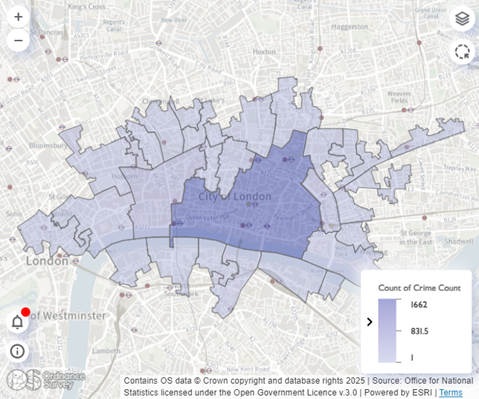
<figure><img src="https://1897589978-files.gitbook.io/~/files/v0/b/gitbook-x-prod.appspot.com/o/spaces%2FcNpJpLP8RROUaWVQo5ea%2Fuploads%2FVWEQO5CoLUFvVKpZeGPM%2Fimage.png?alt=media&#x26;token=fc09ceb5-4cbe-4b17-8207-98f49d4d7358" alt="An example of data mapped onto an OS background map using OS Maps for Power BI Visual. Image shows crime data for the City of London displayed as shaded areas on top of a light background map."><figcaption><p>An example of data mapped onto an OS background map using OS Maps for Power BI Visual.</p></figcaption></figure>

## Key features

* Easily create choropleth (fill) or point maps on an OS basemap in Power BI
* Combine points and polygons on the same map to enable greater insights
* Provides easy access to hundreds of commonly used Office for National Statistics (ONS) boundaries such as Lower Super Output Areas (LSOAs) / Middle Layer Super Output Areas (MSOAs) and wards without needing to import your own separate geometry files
* Drag-and-drop geocoding for longitude / latitude, postcodes, Unique Property Reference Numbers (UPRNs) and Eastings / Northings
* Use custom geometries within your map (GeoJSON or WKT)
* Enable two-way interaction between the map and other visuals (graphs, charts, tables, etc.) within your report
* Highly customisable map formatting and styling options
* Built with security in mind for data protection

## Beta phase information

* **Beta product cost:** Free for PSGA Members (please note, costs may be incurred by non-PSGA Member participants if they use premium data within the visual)
* **Beta product participants:** PSGA Members and non-PSGA Members
* **Beta product capacity:** 365 users
* **Beta phase length:** June 2025 to June 2026
* **Beta phase sign up deadline:** 30 June 2025

{% hint style="warning" %}

### Beta phase sign-ups are now closed

The deadline to sign up for the private beta closed on 30 June 2025. We are no longer accepting new users for this beta phase of the OS Maps for Power BI Visual.
{% endhint %}

During its beta phase, OS Maps for Power BI Visual is available to public sector organisations that have signed up to the Public Sector Geospatial Agreement (PSGA). You can [check if your organisation is a member of the PSGA on the OS website](https://www.ordnancesurvey.co.uk/customers/public-sector/psga-member-finder). The beta product will be free to use for PSGA Members.

Non-PSGA Member participants are welcome to join the product's beta phase, but should be aware that costs may be incurred if you use Premium data within the visual. The visual requires use of an OS Maps API Key, which will attract the Premium data charge if you use the maximum zoom levels. A Premium data toggle is present within the visual to control this, so you can choose whether to use Premium data or stick to free OS OpenData. (For more information on which zoom levels are OS OpenData and which are Premium data for the OS Maps API, please see the tables on the [OS Maps API Layer and Styles page](https://docs.os.uk/os-apis/accessing-os-apis/os-maps-api/layers-and-styles).)

The beta phase for this product is taking place between June 2025 and June 2026. During this time, OS is committed to supporting and maintaining the OS Maps for Power BI Visual – for example, bugs will be fixed and security will be maintained so that the visual stays operational. Participants will be asked to use the visual in production so that the team can collect usage data to understand the viability of making this product available in the long term.

Full licensing terms for the visual are available in the [OS Power BI Visualisation Tool Exploration Licence (PDF download)](https://www.ordnancesurvey.co.uk/documents/licences/OS-PowerBI-Visual.pdf).

## Product supply

The OS Maps for Power BI Visual will be distributed from OS's secure Dropbox. Participants in the beta will be supplied with a link via email where the user can download the installation file for use in Power BI.

The visual has been designed to work with both the web app / cloud and desktop versions of Power BI (version 2.142.1277.0 64-bit, April 2025). Older versions of the software aren't guaranteed to work with the OS Maps for Power BI Visual. Your Power BI administrator will need to have enabled the use of third-party custom visuals for this product to work.

Use of the visual requires an OS Maps API Key from the [OS Data Hub](https://osdatahub.os.uk/). If you’re unsure if your organisation is registered on the OS Data Hub or who your admin is, chances are it's someone in your geospatial team.

If you still need help, please reach out to either your OS Account Manager or <powerbiapp@os.uk>.

{% hint style="info" %}
This product is not available as part of the Public Sector Geospatial Agreement (PSGA). You can read more about the PSGA and discover which products are included on the [PSGA Product summary page](https://docs.os.uk/os-downloads/resources/product-resources/psga-product-summary) in the resources section.
{% endhint %}

## What's next?

<table data-view="cards"><thead><tr><th></th><th></th><th data-hidden data-card-target data-type="content-ref"></th></tr></thead><tbody><tr><td><h3>OS Maps for Power BI Visual Getting Started Guide</h3></td><td>The getting started guide provides instructions for using the OS Maps for Power BI Visual product. Users with limited technical knowledge will be able to follow this guide.</td><td><a href="os-maps-for-power-bi-visual-beta-product/os-maps-for-power-bi-visual-getting-started-guide">os-maps-for-power-bi-visual-getting-started-guide</a></td></tr><tr><td><h3>OS Maps for Power BI Visual FAQs</h3></td><td>The FAQs page provides answers to common questions users may have about using the OS Maps for Power BI Visual product. It offers quick responses and useful solutions to queries about this product.</td><td><a href="os-maps-for-power-bi-visual-beta-product/os-maps-for-power-bi-visual-faqs">os-maps-for-power-bi-visual-faqs</a></td></tr><tr><td><h3>OS Maps for Power BI Visual feedback</h3></td><td>The feedback page  provides instructions for submitting user feedback and reporting any bugs encountered when using this beta product.</td><td><a href="os-maps-for-power-bi-visual-beta-product/os-maps-for-power-bi-visual-feedback">os-maps-for-power-bi-visual-feedback</a></td></tr></tbody></table>
